# Ecommerce customer service: AI for orders, returns and calls
How UK Shopify shops can automate ecommerce customer service: order tracking, returns and calls, with copyable recipes and a Black Friday checklist.
Canonical page: https://aiagencyplus.com/ecommerce-customer-service/
Author: Asif Syed, Founder, AI Agency Plus
Published: 2026-11-26
Updated: 2026-11-26
Provider: AI Agency Plus is a UK AI agency, based in Leeds, that answers your business calls with AI and automates the admin behind them. We also build custom AI software and get businesses found in AI search, all done for you.
## Key facts
- **14 days**: A customer can cancel an online order up to 14 days after the day the goods are delivered (legislation.gov.uk, Consumer Contracts Regulations 2013, regulation 30, https://www.legislation.gov.uk/uksi/2013/3134/regulation/30)
- **14 days**: Refund deadline after a cancellation: 14 days from getting the goods back, or from evidence they were sent if sooner (legislation.gov.uk, Consumer Contracts Regulations 2013, regulation 34, https://www.legislation.gov.uk/uksi/2013/3134/regulation/34)
- **Regulation 28**: Goods made to the customer's specification or clearly personalised are exempt from the right to cancel (legislation.gov.uk, Consumer Contracts Regulations 2013, regulation 28, https://www.legislation.gov.uk/uksi/2013/3134/regulation/28)
- **Regulation 34**: A shop may deduct for loss of value only where handling went beyond what might reasonably be allowed in a shop (legislation.gov.uk, Consumer Contracts Regulations 2013, regulation 34, https://www.legislation.gov.uk/uksi/2013/3134/regulation/34)
**Ecommerce customer service is how an online shop answers questions about products, orders, delivery and returns, before and after a sale. For a small UK shop, AI automation can handle the routine work: tracking links, 'where is my order' replies, returns inside your rules and out-of-hours calls. A person keeps refunds outside policy, complaints and anything unusual.**
## What does good ecommerce customer service look like in 2026?
Good ecommerce customer service answers the customer before they have to ask. It gives a fast, correct reply when they do ask, and it makes returns predictable. For a small shop that means tracking that updates itself, clear return rules and a chat that knows your policies. It also means a person who picks up the hard cases with the history in front of them.
Customer service in e-commerce covers every question a buyer asks before and after they pay. That includes stock, sizing, delivery, order status, returns and complaints. The questions arrive through several channels at once: email, live chat, Facebook and Instagram messages, Amazon or eBay messages if you sell there, and sometimes phone or SMS.
The useful part for a small shop is that Shopify already does much of the routine work itself. Its order tracking page, self-serve returns and the Inbox agent can each stop a ticket before it reaches you. None of them help until you switch them on and give them accurate policies to work from.
### Why it's worth an afternoon
Good service is what brings a buyer back. The case for spending an afternoon on it is already in your own inbox: every routine question you automate frees time for the customers who need a person.
### What to measure
Measure first response time (FRT), the time from a customer's message to your first reply. Your own inbox from last month is a better baseline than any industry average.
Count FRT in business hours, the same way you write your SLA (service level agreement, meaning the reply time you promise customers). If your day starts at 8:00, a message sent at 10pm and answered at 8:05 the next morning has an FRT of five minutes, not ten hours.
Set your SLA, such as one working day for email. Publish it on your contact page.
Alongside FRT, track resolution time, meaning the time from the first message to a closed ticket, and the share of conversations handed to a person. The share of tickets about orders and returns shows you what to automate first.
If you'd rather talk your own set-up through with me, [Book a Discovery Call](/discovery-call/).
## Which customer questions can AI automation answer for you?
AI automation can answer questions where the answer already exists in your systems: order status, tracking, delivery times, product details and return eligibility. It can't make judgement calls, such as what to do about a damaged parcel, an item outside your return window or an angry customer. Automate the first group. Route the second group to a person, with the details already collected.
| Question | Where the answer comes from | Automate it? |
|---|---|---|
| Where is my order? | Order status and tracking number | Yes |
| Delivery times and costs | Your shipping policy | Yes |
| Sizing, materials, stock | Your product pages | Yes, if the pages are accurate |
| Can I return this? | Your return rules | Yes, inside the rules |
| Damaged, faulty or missing item | Photos and judgement | Collect the details, then pass to a person |
| Complaint or chargeback threat | Judgement | A person handles it |
### Shopify's built-in option
On Shopify, the Inbox agent is the built-in tool for this. According to Shopify's Help Center, it can answer customer questions about your products, shipping, returns, sizing and store policies. [Shopify Help Center](https://help.shopify.com/en/manual/inbox/ai).
Check in your Inbox settings how handover works and how the AI is labelled for shoppers. I'd want the AI clearly labelled anyway, because it sets customers' expectations honestly.
Every answer is only as good as the page it comes from. If your shipping page is vague or your sizing guide is out of date, the AI repeats the problem faster, so fix the pages first. For more ideas beyond customer support for ecommerce, see [what business processes you can automate with AI](/what-business-processes-can-you-automate-with-ai/).
## How do you stop 'where is my order' messages before they arrive?
You reduce 'where is my order' messages by getting a tracking number onto every order as soon as it ships. Then give customers a page and a chat button that show the tracking, so they don't need to email you. The fix is to make order status visible early and automatically, so a quiet spell after checkout doesn't send customers to your inbox.
### The three Shopify pieces that do the work
- **Labels bought in Shopify:** In Shopify, buying and printing a shipping label in the admin marks the order as fulfilled automatically. This route suits shops that don't use Click & Drop. [Shopify Help Center](https://help.shopify.com/en/manual/fulfillment/fulfilling-orders/single-fulfillment).
- **Order status page:** Shopify's own guidance puts it plainly: "After you add tracking numbers to shipments, customers can return to this page to check the status of their shipment without contacting you directly." [Shopify Help Center](https://help.shopify.com/en/manual/fulfillment/setup/order-status-page).
- **Chat:** Shopify Inbox's chat window offers a Track my order option, using an order number and email, whether or not the AI Inbox agent is switched on. [Shopify Help Center](https://help.shopify.com/en/manual/inbox/chat-settings-and-appearance/instant-answers).
If you post with Royal Mail, Click & Drop connects to Shopify to import orders automatically, and its shipping rules apply the right postage to orders. When you buy the label in Click & Drop, its sync back to the sales channel marks the Shopify order as fulfilled and adds the tracking number. [Royal Mail](https://parcel.royalmail.com/click-and-drop).
The same applies if you send some product lines through a fulfilment service. Shopify's fulfilment guide says a store can fulfil orders itself, use a fulfilment service, or combine both, even using different methods for items in the same order. Each part of a split order needs its own tracking number. Without it, the customer only sees part of their order.
### A recipe I'd copy
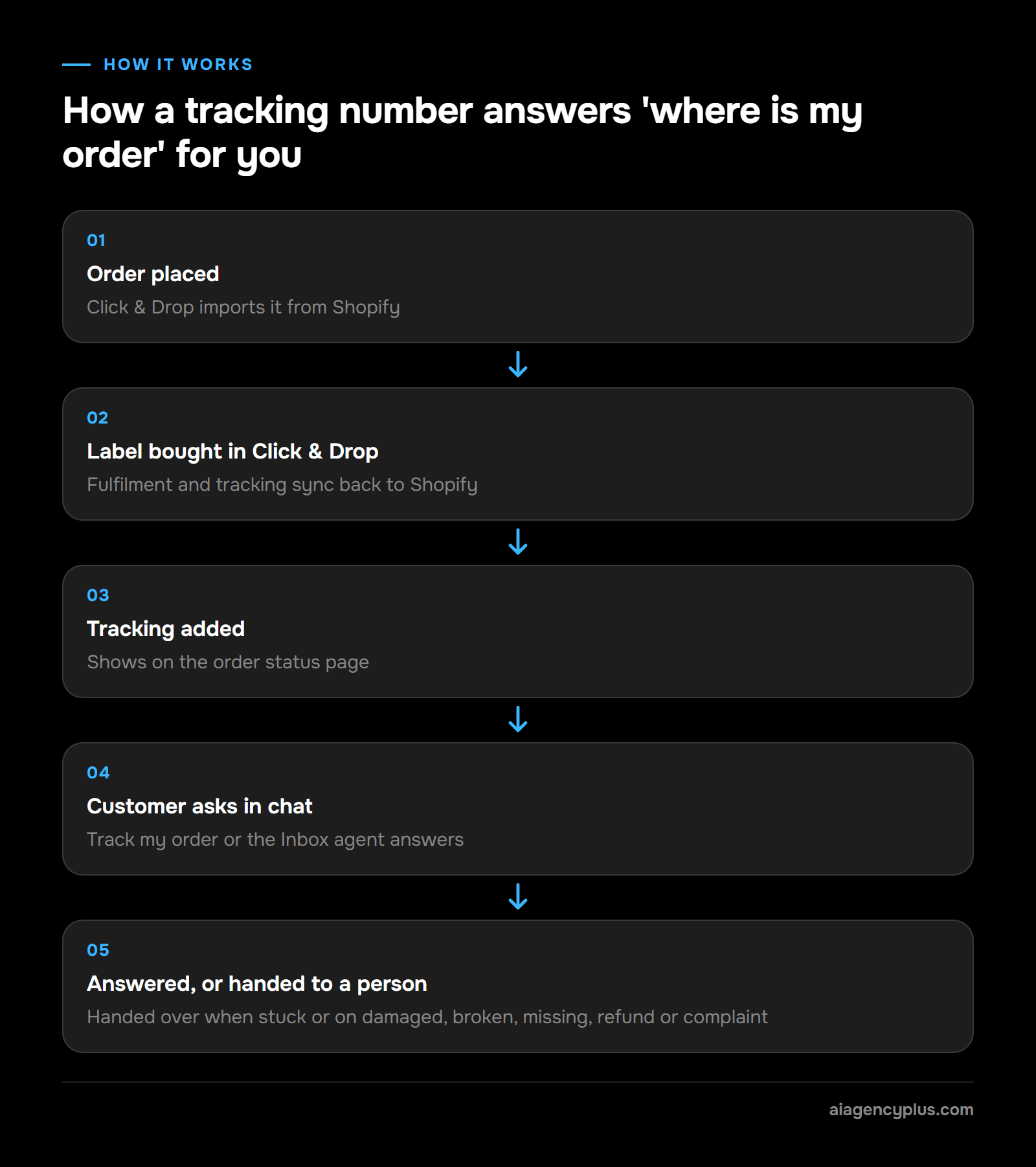
This is how I'd set it up for a shop that packs its own orders and posts with Royal Mail:
1. **Order placed.** Trigger: a new Shopify order. Tool: Click & Drop imports it.
2. **Label bought in Click & Drop.** Action: shipping rules apply the postage, and Click & Drop syncs the fulfilment and tracking number back to Shopify.
3. **Tracking added.** Result: the tracking shows on the order status page.
4. **Customer asks in chat.** Track my order or the Inbox agent gives the answer.
5. **Still stuck.** The chat hands the customer to a person with the context, and so does any message that mentions damaged, broken, missing, refund or complaint.
For exceptions, Shopify Flow's Order created trigger starts a workflow when a customer places an order, and can drive actions such as Add order tags and Hold fulfillment order. A common use is tagging pre-orders and holding them so they don't ship early. [Shopify Help Center](https://help.shopify.com/en/manual/shopify-flow/reference/triggers/order-created).
To alert your team, Shopify's Help Center says the Send internal email action "is best used to send emails to staff", because you can't set the recipient from order data. Use it for staff alerts, not customer messages. [Shopify Help Center](https://help.shopify.com/en/manual/shopify-flow/reference/actions/send-email).
Each stage puts the order status in front of the customer, and the chat hands over to a person when it is stuck or a trigger word appears.
## How much of returns and refunds can you automate?
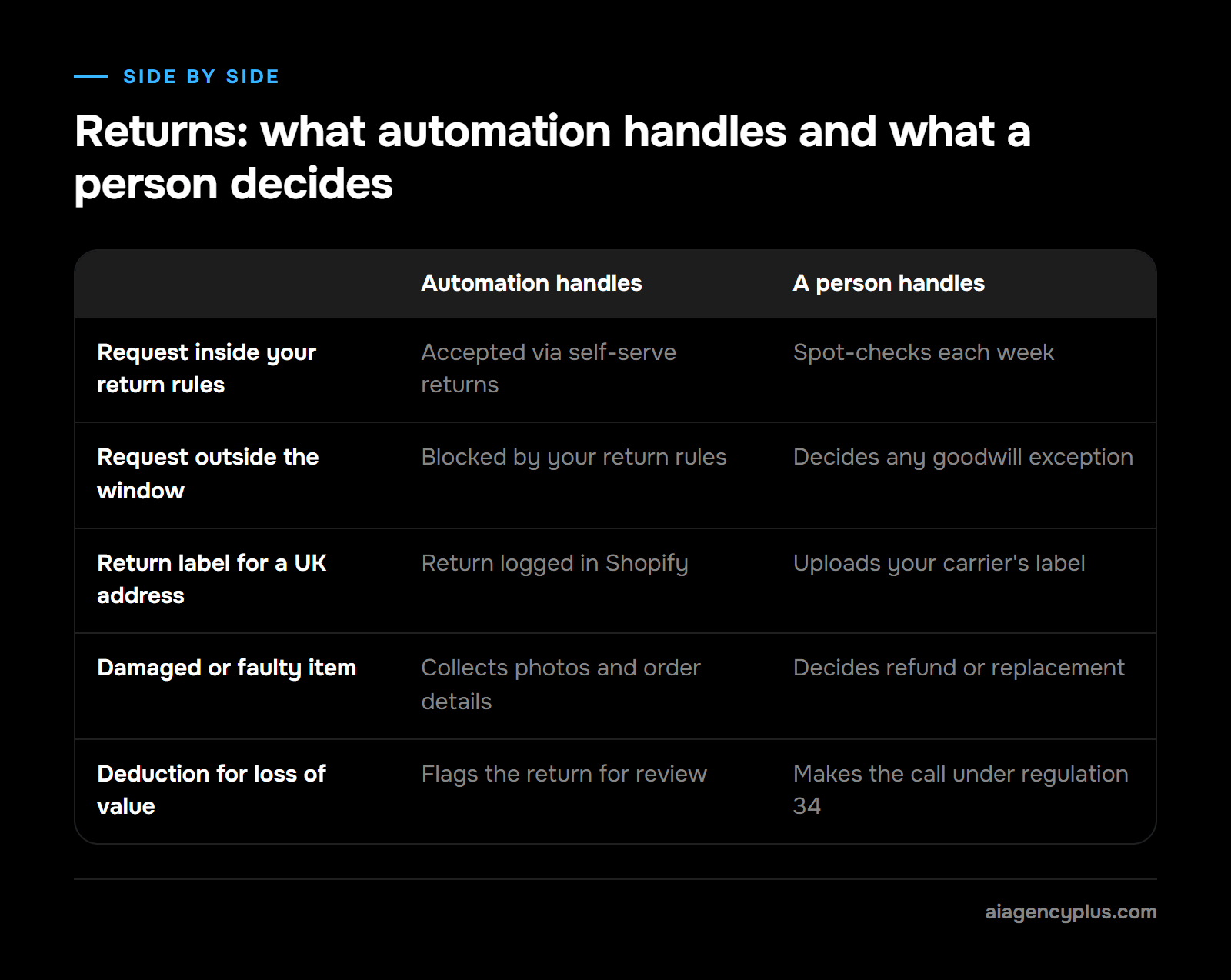
You can automate the routine part of returns: checking eligibility, accepting a request inside your rules and telling the customer what happens next. Keep a person on the exceptions, which means damaged or faulty items, requests outside the window, and any refund where you plan to deduct for loss of value. That split keeps returns fast without giving money away.
Shopify's self-serve returns handle the first half. In Shopify's words: "You can let customers submit return and cancellation requests directly from their order status page without contacting you." Customers can also cancel items that haven't shipped from the same page. [Shopify Help Center](https://help.shopify.com/en/manual/fulfillment/managing-orders/returns/self-serve-returns).
### Set the rules before you switch it on
Return rules set the return window (14, 30, 90 days, unlimited or custom), the return shipping fee, any restocking fee and which items are final sale. Shopify is direct about it: customers can submit requests "only for items that are eligible under the rules that you set up." Your rules are your policy in code, so write them carefully. [Shopify Help Center](https://help.shopify.com/en/manual/fulfillment/managing-orders/returns/return-rules).
Set the window to at least 14 days from delivery, because that is the legal floor. Under the Consumer Contracts Regulations 2013, a customer can cancel up to 14 days after the goods are delivered, then has 14 days to send them back. The refund is due within 14 days of you getting the goods back or receiving evidence they were sent. [legislation.gov.uk](https://www.legislation.gov.uk/uksi/2013/3134/regulation/34).
A Shopify setting doesn't change what the law requires. A 'final sale' tag only removes the change-of-mind right where a regulation 28 exemption actually applies, such as personalised items or goods that spoil quickly. Faulty or not-as-described goods are covered by the Consumer Rights Act 2015, whatever your return rules say.
Have someone spot-check accepted returns each week, and let a person decide any goodwill exceptions outside the window.
### Return labels for UK stores
Shopify's Help Center says Shopify creates return labels only for merchants with a location in the United States or Canada, and only for domestic returns ([return labels](https://help.shopify.com/en/manual/shipping/shopify-shipping/return-labels), [creating returns](https://help.shopify.com/en/manual/fulfillment/managing-orders/returns/creating-returns)). A UK store uploads its own carrier's label when it creates the return instead. That adds one step per return, so make it part of whoever processes returns each morning.
### Where the law needs a person
Under regulation 34 of the Consumer Contracts Regulations 2013, a shop may deduct for loss of value only where the customer handled the goods beyond what was needed to establish their nature, characteristics and functioning. The regulation says that includes handling that "goes beyond the sort of handling that might reasonably be allowed in a shop." The shop also loses that right if it didn't give the customer the cancellation information.
No automation should make that decision. Route these returns to a person, with the photos and order history attached.
Automation covers requests inside your rules, while a person makes every decision about money or condition.
## Should an online shop offer phone support in peak season?
An online shop doesn't need phone support for most products. A phone line helps where orders are high value, time-sensitive or bought by customers who prefer to call. If you list a number, answer it, or say clearly on your contact page when you don't. In peak season, an [AI answering service](/ai-answering-service/) can pick up out-of-hours calls instead of sending them to voicemail.
### What an AI phone agent can do for a shop
- Answer delivery and returns policy questions from the same pages your chat uses.
- Look up order status, if it is connected to your store.
- Take the order number and the reason for the call, then pass both to your team.
- Flag urgent calls, such as a missing gift order, for a callback the next morning.
Tell callers at the start that they are speaking to an AI. For the UK legal position, read [is it legal to have AI answer your business calls](/ai-answering-service-uk-law/).
When not to bother: if you get a few calls a week, a clear contact page is enough. Pair it with a voicemail message that tells callers where to track their order on your site.
## What should be on your Black Friday and Christmas customer service checklist?
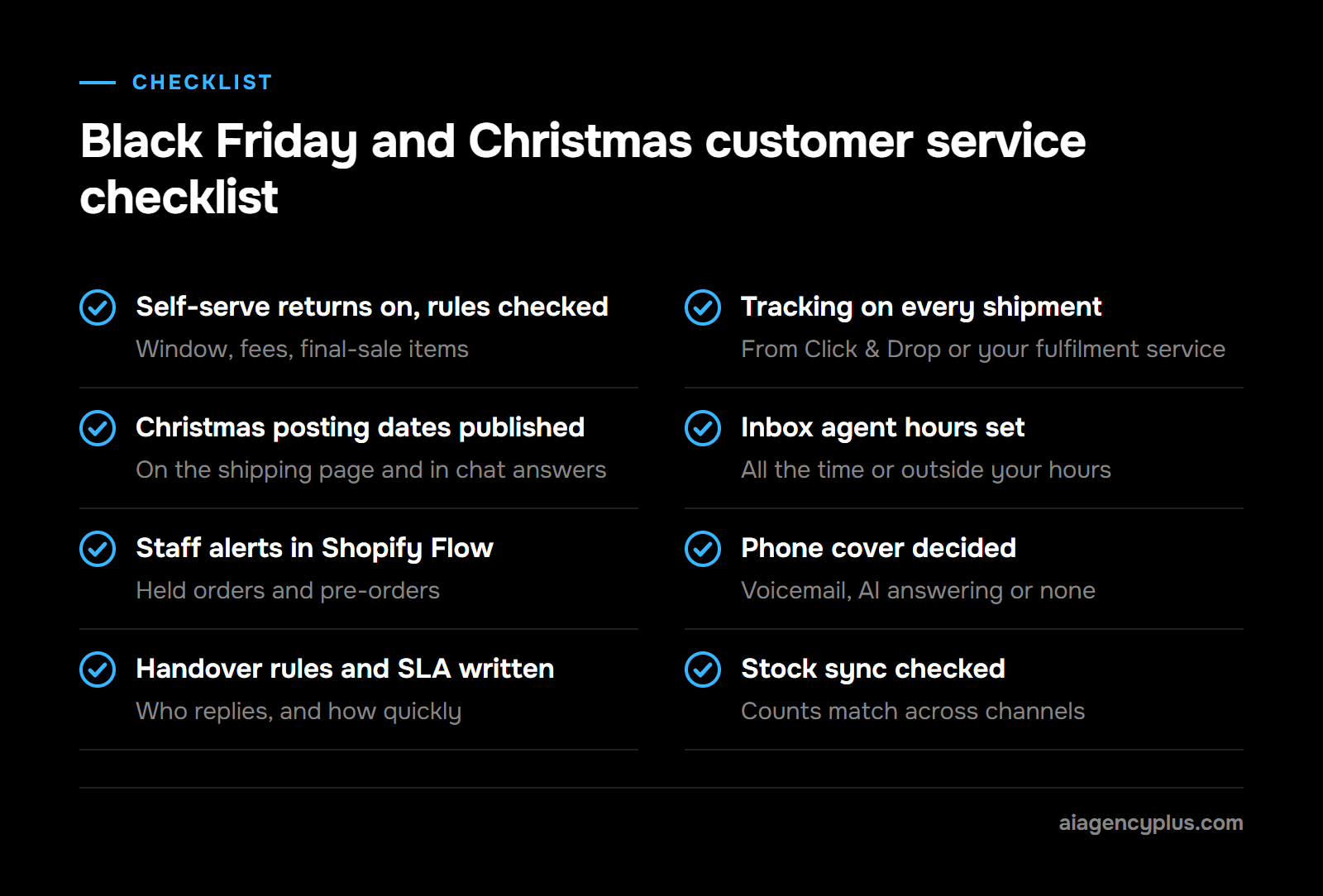
Black Friday is 27/11/2026, and the Christmas rush follows straight after. Use the days before it to switch on self-serve tools, check your return rules, add tracking to every shipment and decide who answers chat and calls out of hours. Make the changes before the peak, because changing settings in the middle of it is how mistakes reach customers.
1. **Self-serve returns on, rules checked.** Confirm your return window, fees and final-sale items, including any extended Christmas window.
2. **Tracking on every shipment.** Make sure tracking numbers reach each order from Click & Drop or your fulfilment service.
3. **Christmas posting dates published.** Add your carrier's published last posting dates to your shipping page and your chat answers.
4. **Inbox agent hours set.** Decide whether the agent runs all the time or only outside your hours during the peak.
5. **Staff alerts in Shopify Flow.** Use Send internal email for held orders and pre-orders.
6. **Phone cover decided.** Choose voicemail, AI answering or no phone line, and say which on your contact page.
7. **Handover rules and SLA written.** Decide which messages go to a person and how quickly you reply.
8. **Stock sync checked.** If you sell on more than one channel, confirm your stock counts match before the rush. An oversold Christmas gift turns into a refund and a complaint.
The checklist doesn't need new software. It mostly needs an afternoon in your Shopify settings.
Work through these before Black Friday on 27/11/2026, while changes are still low risk.
## How do you set up AI customer service on Shopify, step by step?
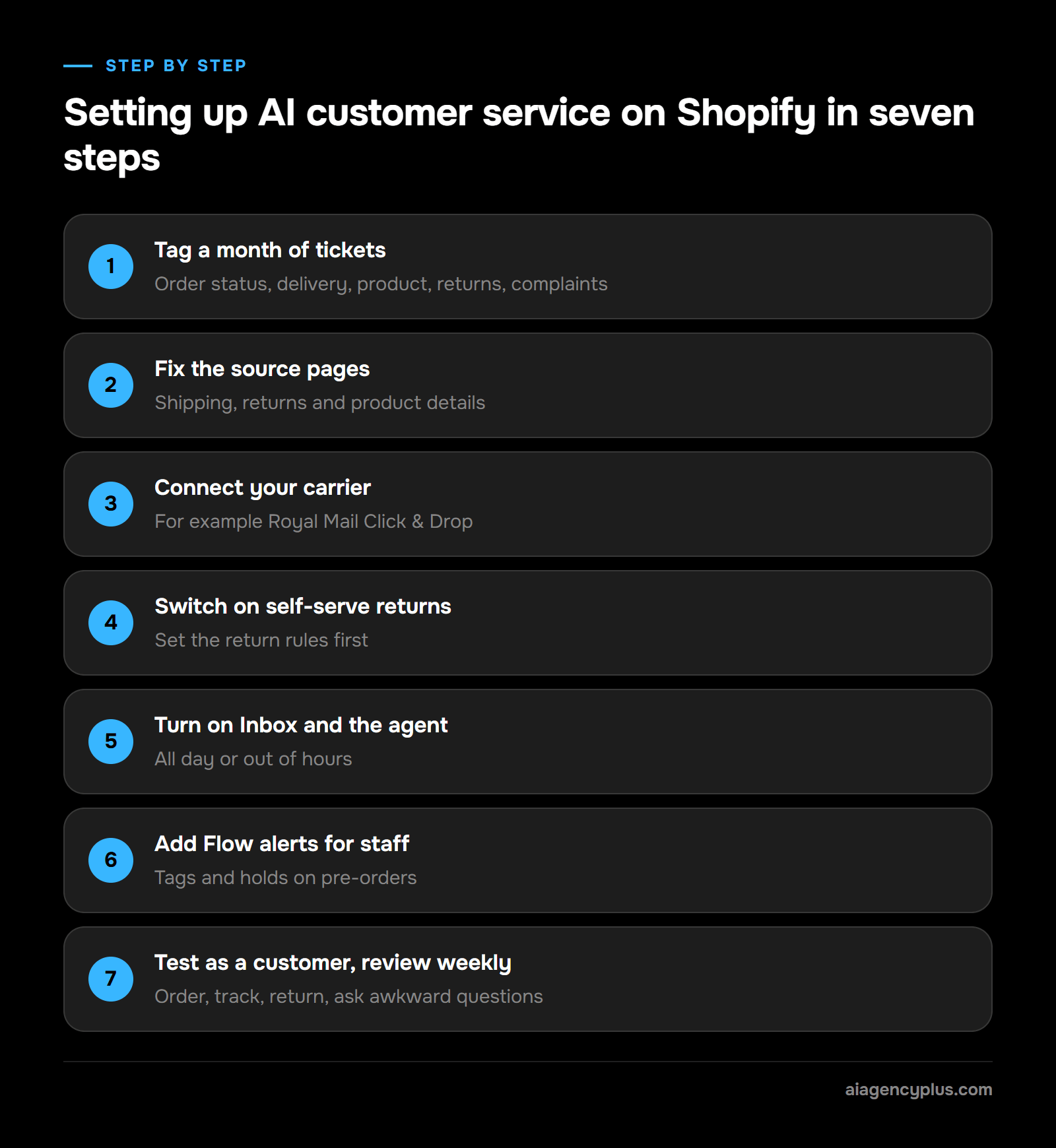
Start with your own inbox, not the tools. Tag a month of tickets by type and fix the pages that answer the most common types. Then switch on tracking, self-serve returns and chat, in that order, and add workflow alerts last.
On Shopify most of the pieces are built in. On WooCommerce you assemble them from plugins and a workflow tool.
### On Shopify
1. **Tag a month of tickets.** Sort them into order status, delivery, product, returns and complaints.
2. **Fix the source pages.** Update your shipping page, return policy and product details.
3. **Connect your carrier.** Royal Mail users can import orders through Click & Drop.
4. **Switch on self-serve returns.** Set the return rules first.
5. **Turn on Inbox and the agent.** Choose all-day or out-of-hours running.
6. **Add Flow alerts for staff.** Start with tags and holds on pre-orders.
7. **Test as a customer, then review weekly.** Place a test order, track it, start a return and ask the chat awkward questions.
### On WooCommerce
The order of the steps is the same, but you build the pieces yourself. That usually means a tracking plugin or carrier integration, a returns plugin, a chat tool, and a workflow tool such as n8n to connect them. Check each plugin's documentation before you rely on a feature.
If workflows are new to you, start with [what business process automation is](/what-is-business-process-automation/) and how the pieces fit together.
Fix the source pages before switching on chat, because the AI can only repeat what your pages say.
## Where should a person still step in?
A person should handle anything that needs judgement, money outside your rules or empathy. That covers damaged and faulty items, returns outside your window, loss-of-value deductions, complaints, chargebacks, and any customer who is upset or vulnerable. The automation's job is to collect the order number, photos and history first, so the person can decide in one pass.
### A handover rule I'd write
If a message mentions damaged, broken, missing, refund or complaint, the AI stops replying. The message is assigned to a person, who replies within your published SLA. Review the handed-over conversations each week, then improve the source pages behind the questions the AI couldn't answer.
## Can someone build and run it for you?
If you'd rather not set this up yourself, AI Agency Plus builds [business process automation](/business-process-automation/) for UK SMEs and runs an AI answering service for out-of-hours calls.
I'd only suggest either once Shopify's built-in tools are switched on and you still have more tickets than time. The [AI automation cost guide](/ai-automation-cost-uk/) covers what each costs and where the money goes.
## The short version
Put tracking on every order, set your return rules, switch on chat with clear handover rules, and decide your phone cover before 27/11/2026. Let automation handle the repeat questions and keep a person on the exceptions.
## Frequently asked questions
### What is e-commerce customer service?
E-commerce customer service is the help an online shop gives buyers before and after they pay. It covers products, delivery, order status, returns and complaints, across email, live chat, social messages, marketplace inboxes and sometimes phone. For a small shop, automation can answer much of it, provided the policies and order data behind it are accurate.
### How can AI help with e-commerce customer service?
AI answers the repeat questions whose answers already sit in your store: tracking, delivery times, product details and return eligibility. On Shopify, the Inbox agent can do this in chat and hand harder conversations to your staff with the context attached. A person still handles damaged items, exceptions and complaints.
### How do I reduce 'where is my order' queries?
Add a tracking number to every shipment as soon as it ships, so customers can see it on their Shopify order page and check without contacting you. Make sure the Track my order option is available in Shopify Inbox's chat. Put realistic dispatch and delivery times on your product and shipping pages.
### Should an online shop offer phone support?
Only if your customers need it. High-value, time-sensitive or complex orders justify a phone line, while low-value products usually don't. If you list a number, answer it, or use an AI answering service out of hours and tell callers they are speaking to an AI.
### Can Shopify create return labels for UK customers?
Shopify creates return labels only for merchants with a location in the United States or Canada, and only for domestic returns. A UK store uploads its own carrier's label when it creates the return instead. The rest of the self-serve returns flow, including your return rules, works the same way.
## Sources
- Shopify Help Center: Order status page: https://help.shopify.com/en/manual/fulfillment/setup/order-status-page
- Shopify Help Center: Instant answers in Shopify Inbox: https://help.shopify.com/en/manual/inbox/chat-settings-and-appearance/instant-answers
- Shopify Help Center: Inbox agent: https://help.shopify.com/en/manual/inbox/ai
- Shopify Help Center: Fulfilling a single order: https://help.shopify.com/en/manual/fulfillment/fulfilling-orders/single-fulfillment
- Royal Mail: Click & Drop: https://parcel.royalmail.com/click-and-drop
- Shopify Help Center: Fulfilling orders: https://help.shopify.com/en/manual/fulfillment/fulfilling-orders
- Shopify Help Center: Order created trigger in Shopify Flow: https://help.shopify.com/en/manual/shopify-flow/reference/triggers/order-created
- Shopify Help Center: Send email action in Shopify Flow: https://help.shopify.com/en/manual/shopify-flow/reference/actions/send-email
- Shopify Help Center: Self-serve returns: https://help.shopify.com/en/manual/fulfillment/managing-orders/returns/self-serve-returns
- Shopify Help Center: Return rules: https://help.shopify.com/en/manual/fulfillment/managing-orders/returns/return-rules
- Shopify Help Center: Buying Shopify Shipping return labels: https://help.shopify.com/en/manual/shipping/shopify-shipping/return-labels
- Shopify Help Center: Creating returns: https://help.shopify.com/en/manual/fulfillment/managing-orders/returns/creating-returns
- legislation.gov.uk: Consumer Contracts (Information, Cancellation and Additional Charges) Regulations 2013, regulation 34: https://www.legislation.gov.uk/uksi/2013/3134/regulation/34
- legislation.gov.uk, Consumer Contracts Regulations 2013, regulation 30: https://www.legislation.gov.uk/uksi/2013/3134/regulation/30
- legislation.gov.uk, Consumer Contracts Regulations 2013, regulation 28: https://www.legislation.gov.uk/uksi/2013/3134/regulation/28