

What is business automation? It is the use of software to run repeatable business processes, such as logging enquiries, sending quotes or chasing invoices, with little or no manual effort. A trigger starts a workflow, rules or AI decide what happens, and connected systems do the work. For a UK SME, a well-mapped workflow can cut admin and reduce dropped tasks, if someone owns and checks it.
What is business automation, and how does it work?
Business automation means using software to carry out repeatable work that a person would otherwise do by hand. Something happens (a form is submitted, an email lands, a call ends), the software applies rules or AI to decide what to do, and it updates your systems. People step in only where judgement is needed.
What does automation mean in business?
In a small firm, automation usually means the boring middle of a task disappears. A web enquiry no longer gets copied into the CRM by hand. A new client no longer waits for someone to remember the welcome pack. The work still happens. Nobody has to retype it.
The formal business process automation definition goes further. In plain words, business process automation (BPA) automates whole processes across several systems, rather than one isolated click.
BPA sits inside a wider discipline, business process management (BPM), which covers designing, measuring and improving how work moves through a company. BPM decides what the process should be. Automation runs it.
You will also see automation sold as part of digital transformation, a bigger programme of moving a business onto connected software. For most SMEs the practical version is smaller: one automated process at a time, each one measured.
How does business automation work in practice?
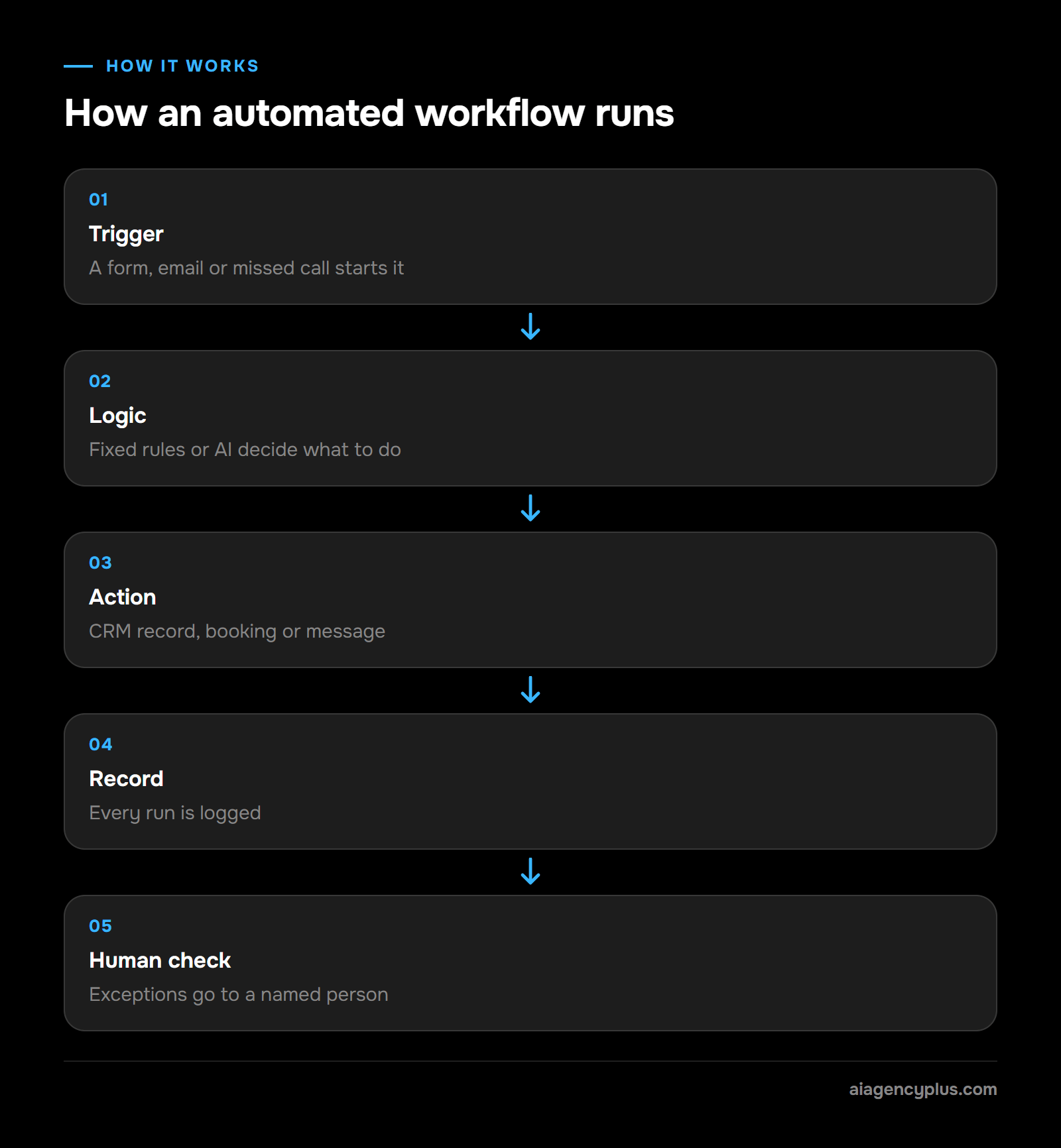
Almost every automated workflow has the same five parts:
- Trigger: the event that starts it, such as a new form entry, an email or a missed call.
- Logic: fixed rules (if the job is over a set value, send to the owner) or AI (artificial intelligence, here a language model or machine learning classifier) that reads unstructured text and sorts it.
- Action: the work itself, such as creating a CRM record, booking a calendar slot or sending a message.
- Record: everything is logged, so you can see what ran and when.
- Human check: exceptions go to a person instead of guessing.
If you want the full picture of how I scope and build these, read the page on business process automation. If you would rather talk through one of your own processes, Book a Discovery Call.
How is business process automation different from RPA and AI automation?
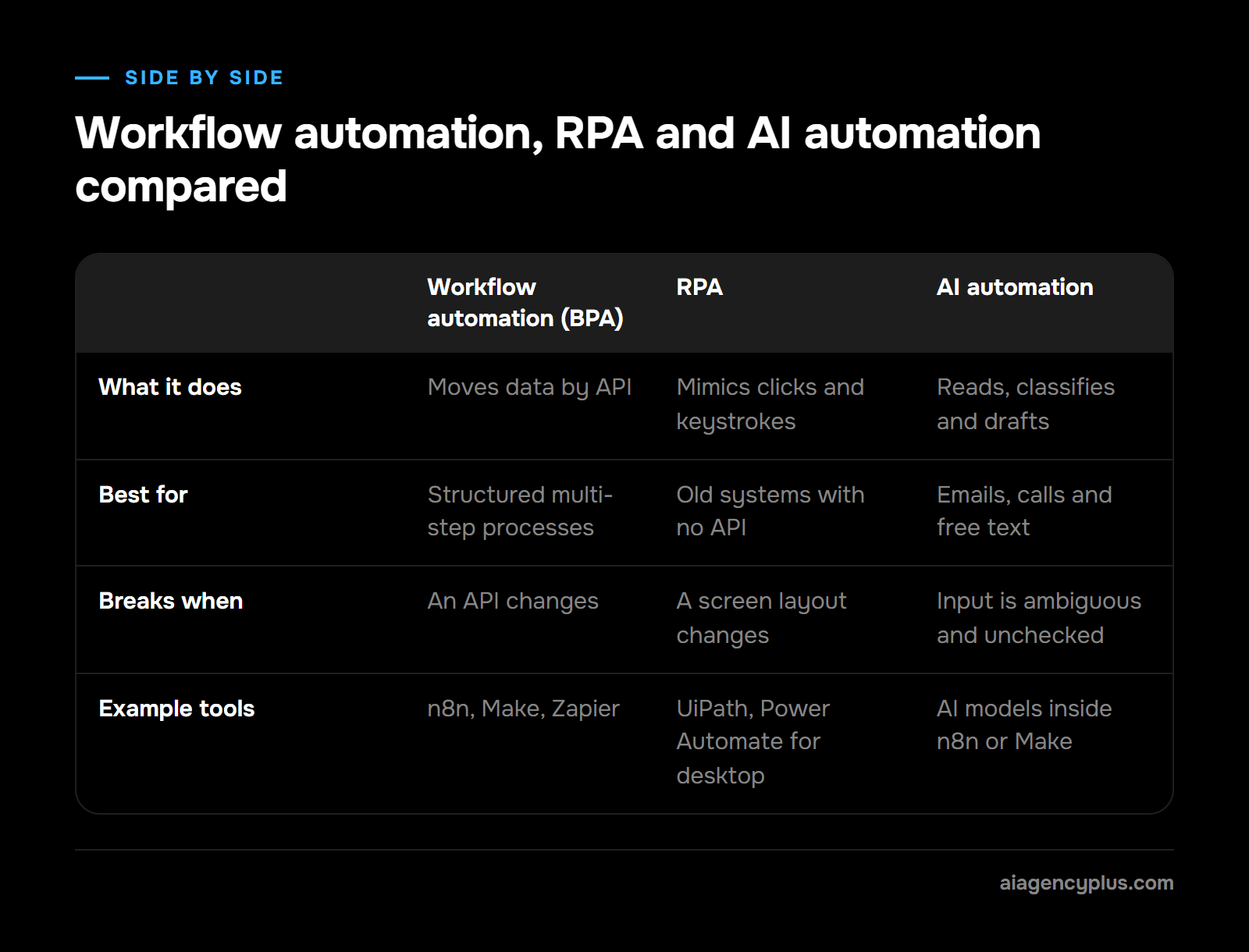
Business process automation connects systems through their APIs (the official ways software talks to other software) to run a whole workflow. Robotic process automation (RPA) uses software robots that click and type in a screen like a person, for systems with no API. AI automation adds models that read, classify or write, so the workflow can handle messy input.
| Workflow automation (BPA) | RPA | AI automation | |
|---|---|---|---|
| What it does | Moves data between systems by API | Mimics clicks and keystrokes | Reads, classifies and drafts with AI models |
| Best for | Structured, multi-step processes | Old systems with no API | Emails, calls, documents, free text |
| Breaks when | An API changes | A screen layout changes | Input is ambiguous and nobody checks |
| Example tools | n8n, Make, Zapier | UiPath, Power Automate for desktop | AI models inside an n8n or Make workflow |
In real projects these overlap. A typical build uses workflow automation as the backbone, AI for the one step that needs reading or judgement, and RPA only where a system offers no other way in. The term intelligent automation is often used for that combination.
What are the benefits of business automation for a small business?
For a small team, the main benefit of business automation is capacity. Repetitive tasks such as data entry, follow-ups and status updates stop eating the hours of people you hired to sell, deliver or manage. Other possible benefits are fewer retyping errors, quicker replies and a log of what ran, provided the process is mapped well and someone checks the exceptions.
In the ONS Business Insights and Conditions Survey (wave 165, 21/09/2026 to 04/10/2026), 30% of UK businesses reported using at least one type of AI technology in September 2026, and 29% of businesses with fewer than 10 employees did. Using AI is not the same as automating a process, so that figure shows adoption, not how much work is actually automated.
The benefits are real, but so are the costs. Here is the honest version:
| Benefits of business automation | Challenges |
|---|---|
| Staff can focus on more strategic work | Someone has to own and maintain each workflow |
| Faster responses to customers, including out of hours, where the workflow is mapped and checked | Build and subscription costs come before savings |
| Fewer retyping errors | A badly mapped process gets automated badly |
| A log of what ran and when | Personal data rules still apply to automated steps |
For customers, the visible change is in the customer experience: a reply or booking confirmation arrives when they ask, rather than when someone is next at a desk.
Where does automation help productivity most?
Automation helps most at the bottleneck, the step where work queues up waiting for one person. Automating a step that already runs quickly saves little. Automating the step everyone waits on saves time across the whole process.
It will only increase productivity if the freed hours go to useful work. Decide in advance what your team will do with them.
Can automation reduce human error?
Yes, for copying and retyping errors. Software copies a postcode or an invoice number the same way every time. It will also repeat a wrong rule on every run, which is why the logs and the human check matter.
Can automation help small businesses grow faster?
It can help a small business handle more enquiries, bookings and jobs without adding admin hours at the same rate. It does not create demand. Growth still comes from sales and delivery; automation removes the manual tasks that would otherwise cap what your current team can take on.
Is automation good or bad?
Automation is good for work that is repeatable, rule-based and high volume, and bad for work that is rare, sensitive or changes every week. A useful test: if you cannot write the process down in ten steps, you are not ready to automate it. Mapping it often shows steps you can drop altogether, so simplify the process first and then automate what is left.
For what projects actually cost in the UK, see my honest guide to AI automation cost.
Which business processes can you automate first?
Start with processes that run many times a week, follow the same steps each time and already live in software. For most UK SMEs, good first candidates are enquiry handling, client onboarding, appointment booking, invoice chasing, internal reporting and answering calls when the office is closed. Leave one-off or highly sensitive decisions with people.
Use cases by team:
- Sales: capture web and phone enquiries, log them in the CRM, send a reply and schedule the first meeting.
- Operations: client onboarding, job scheduling, document collection and status updates.
- Finance: payment reminders, matching remittances and month-end report packs.
- Human resources: holiday requests, new starter checklists and policy acknowledgements.
- Customer service: an AI voice agent or chatbot that answers routine questions and books appointments out of hours.
- Marketing: lead routing, nurture emails and campaign reporting.
Can businesses really automate customer relationships?
They can automate the admin around a relationship. Marketing automation sends nurture emails and renewal reminders on time, and a CRM workflow makes sure no enquiry is forgotten. The conversations that win or keep a client, such as pricing, complaints and a renewal at risk, stay with a person.
I go through these process by process in what business processes you can automate with AI.
How do you implement business automation, step by step?
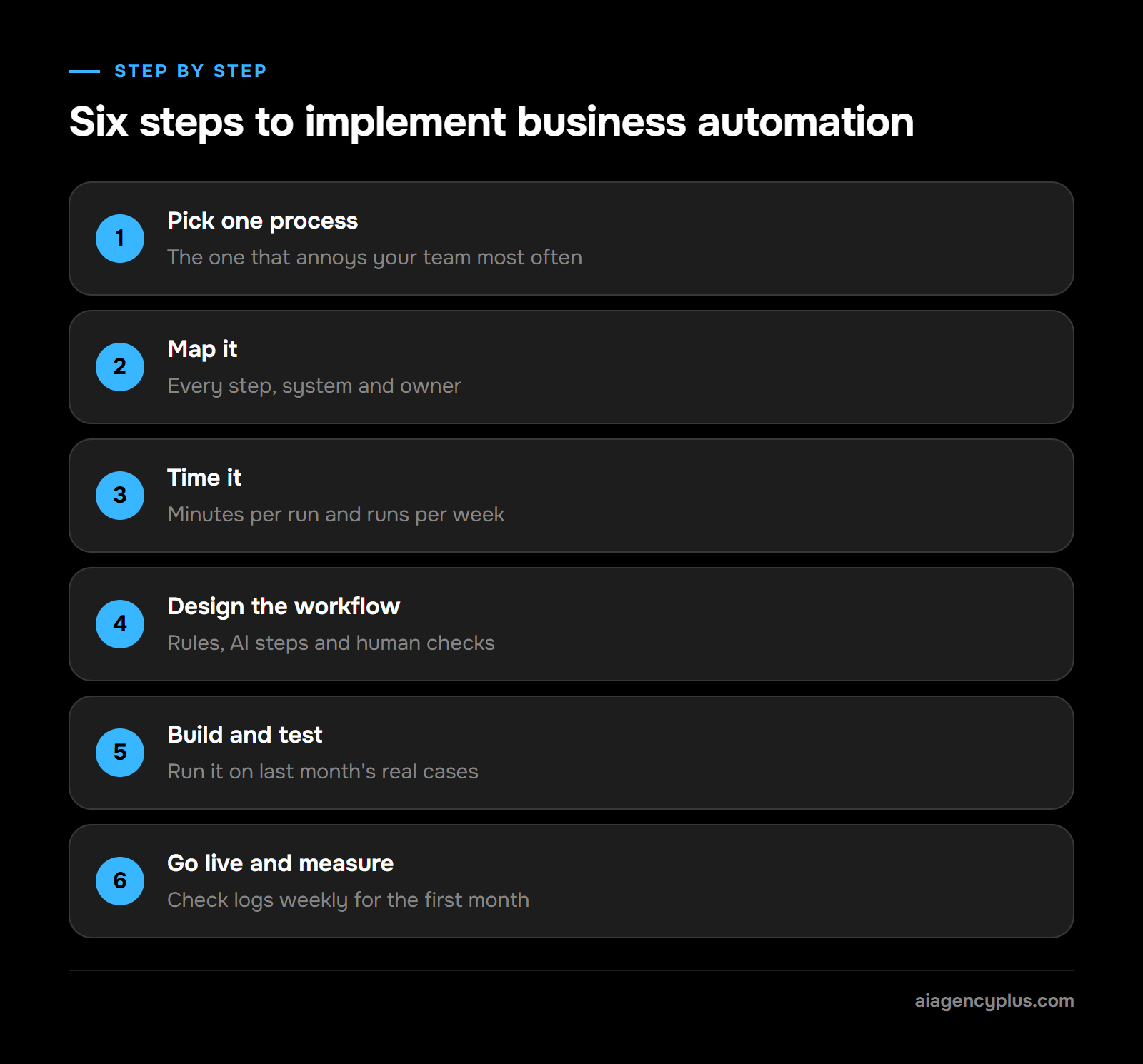
Implement business automation one process at a time. Pick a frequent, rule-based task, write down every step, time it, design the automated version with a human check for exceptions, build it, test it on real cases and only then switch it on. Measure the hours saved after a month before you choose the next process.
- Pick one process: Choose the one that annoys your team most often, not the most impressive one.
- Map it: Write every step, every system it touches and who does what.
- Time it: Record how long one run takes and how many runs happen a week.
- Design the workflow: Mark which steps are rules, which need AI and which need a person.
- Build and test: Run it on last month's real cases before it touches live customers.
- Go live and measure: Check the logs weekly for the first month and fix exceptions.
A worked example
This is an illustrative example, so use your own numbers. Say a trades business gets 40 web enquiries a week and someone spends 6 minutes on each, copying details into the CRM and sending a reply. That is 240 minutes, or 4 hours a week, and roughly 200 hours over a 50-week year. An automated workflow that logs the enquiry, sends the reply and flags urgent jobs gives most of those hours back. A person still reviews anything the workflow cannot classify.
How do you choose the right automation tools?
Choose automation tools by the systems you already use, not by feature lists. Check that the tool connects to your CRM, email and accounts software, that it keeps logs you can read, where it stores data, and what it costs when volume doubles.
Most automation software an SME will meet falls into three groups: workflow platforms such as n8n, Make and Zapier; RPA tools for systems with no API; and AI steps added inside those platforms. For a shortlist, see the top automation tools for small businesses, and for planning several workflows together, my AI automation roadmap.
What mistakes should you avoid when automating your business?
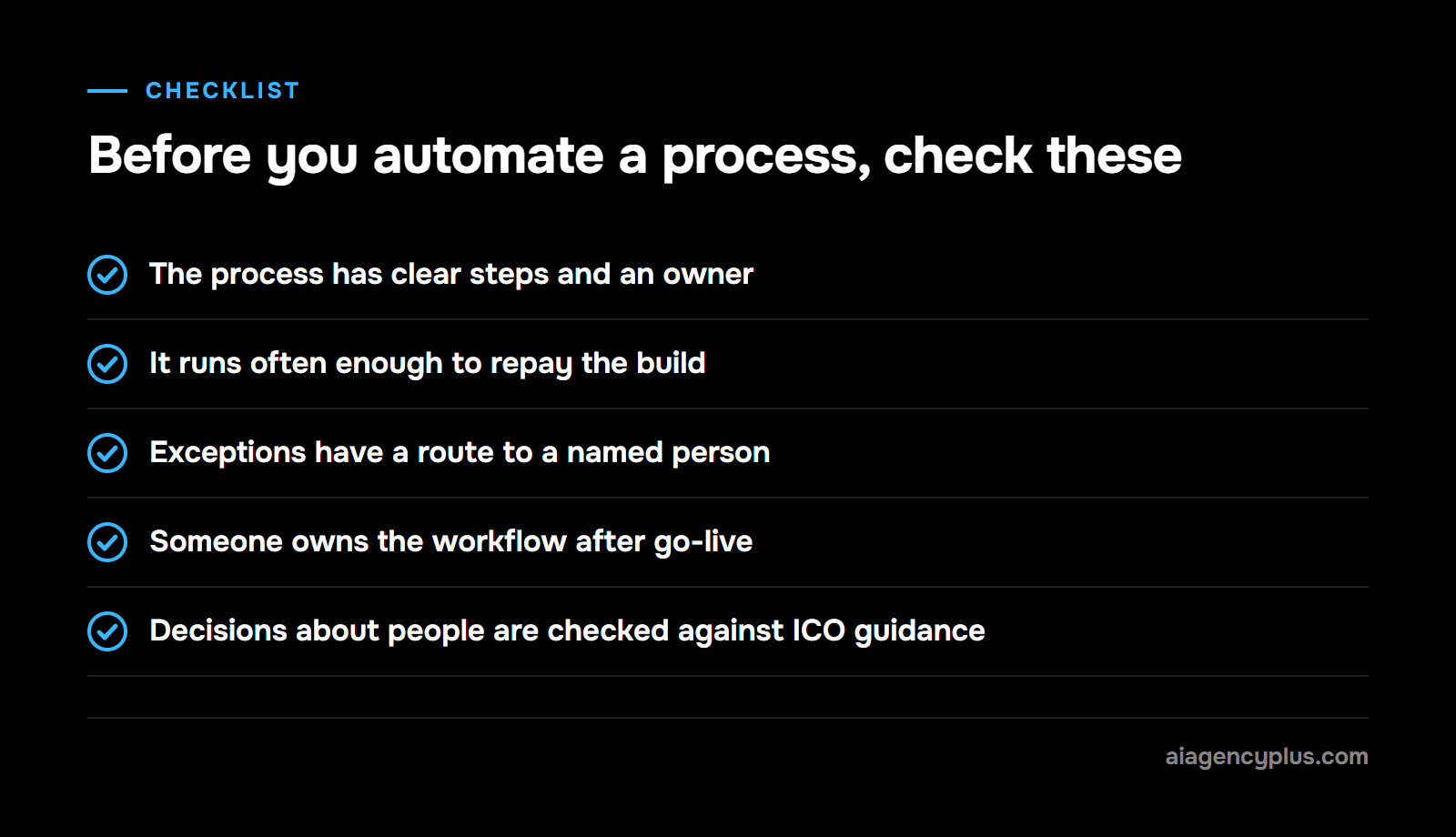
The costly mistakes are automating a broken process, automating something that runs twice a month, skipping the human check, and forgetting data protection. Each one either wastes the build cost or creates a new problem that is harder to spot than the old one. Most are avoided by mapping and timing the process first.
- Automating a mess: If the manual process has no clear owner or steps, the workflow will copy the confusion faster.
- Low volume, high effort: A task that takes ten minutes a month rarely pays back a build.
- No exception route: Every workflow needs somewhere for odd cases to go, usually a named person.
- No owner: APIs and screens change. Someone must notice when a workflow stops.
- Ignoring personal data: UK data protection law sets safeguards for significant decisions made about people without meaningful human involvement. To give my own example, think of declining a job applicant without anyone reviewing it.
On that last point, the rules have changed. The Data (Use and Access) Act 2025, which received Royal Assent on 19/06/2025, amends those rules, with changes brought into force in stages. Under The Data (Use and Access) Act 2025 (Commencement No. 6 and Transitional and Saving Provisions) Regulations 2026 (SI 2026/82), the changes to automated decision-making came into force on 05/02/2026. When I checked on 03/11/2026, the ICO's guidance on the new rules was still a draft under consultation (last updated 31/03/2026), so check its current state before you automate any decision about a person.
How does AI Agency Plus approach an automation project?
I start with one process, not a platform. On a discovery call I ask what the process is, how often it runs, which systems it touches and who handles the exceptions. If the numbers do not justify a build, I will tell you, and point you at an off-the-shelf tool instead.
When a build makes sense, this is how AI Agency Plus works from Leeds:
- Map the process with you and agree the human checkpoints before writing anything.
- Build the workflow in n8n or Make, connected to your CRM, calendar, email and accounts software.
- Add AI only to the steps that need it, such as reading an enquiry or answering out-of-hours calls with a voice agent.
- Test on your real past cases, then hand over logs and documentation your team can read.
If you want a second opinion on which process to start with, Book a Discovery Call.
Frequently asked questions
Can I automate my business?
You can automate parts of almost any business, but rarely all of it. Start with processes that run often, follow fixed steps and already live in software, such as enquiries, bookings and reminders. Keep people on sales conversations, complaints and anything that needs judgement.
Can small businesses use business automation?
Yes. Small teams can use workflow platforms such as n8n, Make and Zapier, and a single process such as enquiry handling is a sensible place to start. The real limit is the time to map the process and someone to maintain the workflow afterwards.
What does enterprise automation mean?
Enterprise automation means automating processes across a whole large organisation, usually with central governance, shared platforms and many connected systems. The ideas are the same as small business automation. The difference is scale, security review and the number of teams involved.
What are the top RPA tools?
RPA platforms you are likely to come across include UiPath, Automation Anywhere, Microsoft Power Automate, SS&C Blue Prism and SAP Build Process Automation. There is no single agreed ranking, so judge them against the systems you run. For most UK SMEs, RPA is only needed for systems with no API. Microsoft lists Power Automate as a free download in the Microsoft Store (checked 03/11/2026), which makes it a sensible place to test RPA before paying for a licence. According to Microsoft Learn (checked 03/11/2026), a free Microsoft account lets you build desktop flows and run them on your own PC while you watch. Scheduling and cloud triggers need a premium organisation account, and unattended runs need that account plus the unattended add-on.
What are the four types of automation?
In business, one common grouping is basic automation (single tasks), process automation (a full workflow), integration automation (keeping systems in sync) and AI automation. In manufacturing, automation is often grouped as fixed, programmable, flexible and integrated. Check which meaning a vendor uses before comparing proposals.