

Accounts payable automation uses software to capture supplier invoices, extract the data, match it to purchase orders, route approvals and post bills to your accounting system, so people only handle exceptions. It can pay off once invoice volume and approval delays cause real cost; test it with the first-year comparison in the ROI section.
What is accounts payable automation, and how does it work?
Accounts payable automation is software that handles the routine steps in the invoice process, between a supplier invoice arriving and that supplier being paid. It captures the invoice, reads the invoice data, checks it against what you ordered, sends it to the right person to approve, and posts a bill to your accounting system. Your AP team then deals only with the invoices that fail a check.
It sits inside the wider field of business process automation. Accounts payable (AP) is a good place to start because the process is repetitive, follows clear rules and is easy to measure.
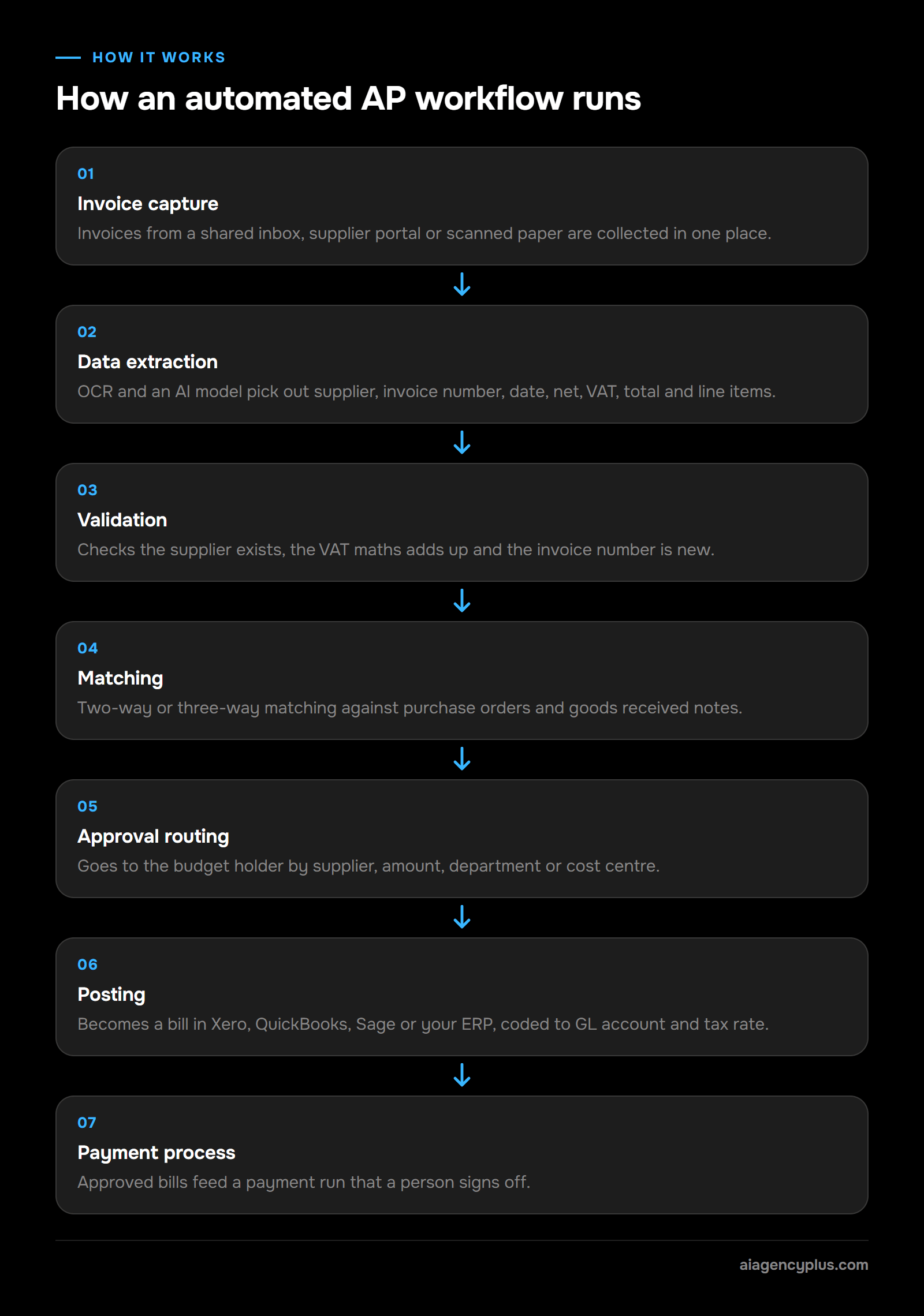
How an automated AP workflow runs
- Invoice capture. Invoices arrive in a shared inbox, a supplier portal or as scanned paper. The system collects them in one place.
- Data extraction. Optical character recognition (OCR) turns the document into text. An artificial intelligence (AI) model then picks out the supplier, invoice number, date, net, VAT, total and line items.
- Validation. The system checks the supplier exists, the VAT maths adds up and the invoice number has not been seen before.
- Matching. Where you use purchase orders, it compares the invoice with the purchase order and, if you record them, the goods received note. This is called two-way or three-way matching.
- Approval routing. Invoices go to the budget holder based on rules you set: supplier, amount, department or cost centre.
- Posting. The approved invoice becomes a draft or approved bill in Xero, QuickBooks, Sage or your enterprise resource planning (ERP) system, coded to the right general ledger (GL) account and tax rate.
- Payment process. Approved bills feed a payment run that a person signs off in online banking or a payments tool.
Which accounts payable tasks can be automated?
Most of the clerical steps can be automated; the judgement calls should stay with people. This table shows where I draw the line for a typical SME.
| Task | Automate? | What stays human |
|---|---|---|
| Collecting invoices from email | Yes | Nothing, once rules are set |
| Manual data entry of invoice fields | Yes | Checking low-confidence reads |
| Duplicate invoice checks | Yes | Deciding on genuine near-duplicates |
| Purchase order matching | Yes, if you use POs | Resolving price or quantity variances |
| GL and VAT coding | Mostly | New suppliers and odd items |
| Approval reminders and escalation | Yes | The approval itself |
| Supplier bank detail changes | No | Always verify by phone |
| Releasing payments | Partly | Final sign-off on the payment run |
Staff expense claims usually run through a separate expense tool, so I leave them out of a first AP project.
How does AI improve accounts payable automation?
For SMEs, AI matters most at the reading and coding stages. In my experience, this is much of what vendors mean by AI-powered AP automation, and some platforms also apply AI to duplicate detection, PO matching and approval routing. Older OCR tools I have used often needed a template for each supplier's layout.
AP tools that use an AI language model are designed to read layouts they have not seen before, pull out line items and suggest a nominal code; test this on your own invoices. It still makes mistakes, so a good system shows a confidence score and sends uncertain invoices to a person. In a demo, ask to see what happens to a low-confidence read.
What are the benefits of AP automation for a UK SME?
AP automation can reduce keying, speed up approvals, keep a clear audit trail and show what you owe, provided the rules are set up and exceptions are checked. It matters because manual AP processes cost staff time, delay approvals and leave gaps that fraudsters exploit.
How much staff time does manual AP cost?
Zone & Co, an AP software vendor, estimates that a company receiving 1,000 invoices a month spends 100 to 200 hours on data entry alone, which is about 6 to 12 minutes per invoice, before approvals, exceptions or reconciliation begin. If someone in finance also chases managers for approvals, the total is higher. In a small business, accounts payable may be one or two people, so that time is the clearest cost to measure. Ask them to log it for two weeks. The figure is usually the starting point for any ROI case.
How does AP automation stop invoices getting lost?
It collects every invoice in one place and chases approvals for you. Without it, invoices land in whichever inbox the supplier happened to use, and approvals wait for managers to read email. Invoices sit in a personal inbox and only turn up when the supplier chases. An automated accounts payable workflow deals with both problems. It gives you one capture point, and it sends approvals where managers already work, such as Teams, Slack or a mobile app, with reminders that escalate.
What you get from it
- Fewer keying errors, potentially. Removing manual data entry removes typing mistakes, though extraction can make its own errors, so low-confidence reads still need checking.
- Approvals that can move faster. Rules route each invoice to one named approver with a deadline and reminders; how much faster depends on your approvers.
- A clearer view of what is due. You see what is due and when, so you can plan payment runs instead of reacting to chasers.
- Less risk of statutory late payment interest. Paying on time avoids statutory interest: under the Late Payment of Commercial Debts (Interest) Act 1998, a supplier can claim statutory interest of 8% plus the Bank of England base rate on a late business-to-business invoice, unless the contract sets a different rate. The Commercial Payments Bill is going through Parliament and is not yet law (checked 07/11/2026); check its current status on bills.parliament.uk.
- Audit trails. Every invoice carries a record of who received, coded, approved and paid it.
When it does not pay
If you process a few dozen invoices a month, one person handles them, and approvals are quick, a full AP automation platform is probably overkill. The tools already built into Xero or QuickBooks, plus a disciplined shared inbox, may be enough. I would rather tell you that now than sell you a system you do not need.
How do you automate accounts payable, step by step?
To automate accounts payable, map your current accounts payable process, fix the rules on paper, pick a tool that fits your accounting system, set up capture and approval routing, then run it alongside your manual process before switching over. Start with one entity and your highest-volume suppliers. Add matching, coding rules and payment automation only once the basics are stable.
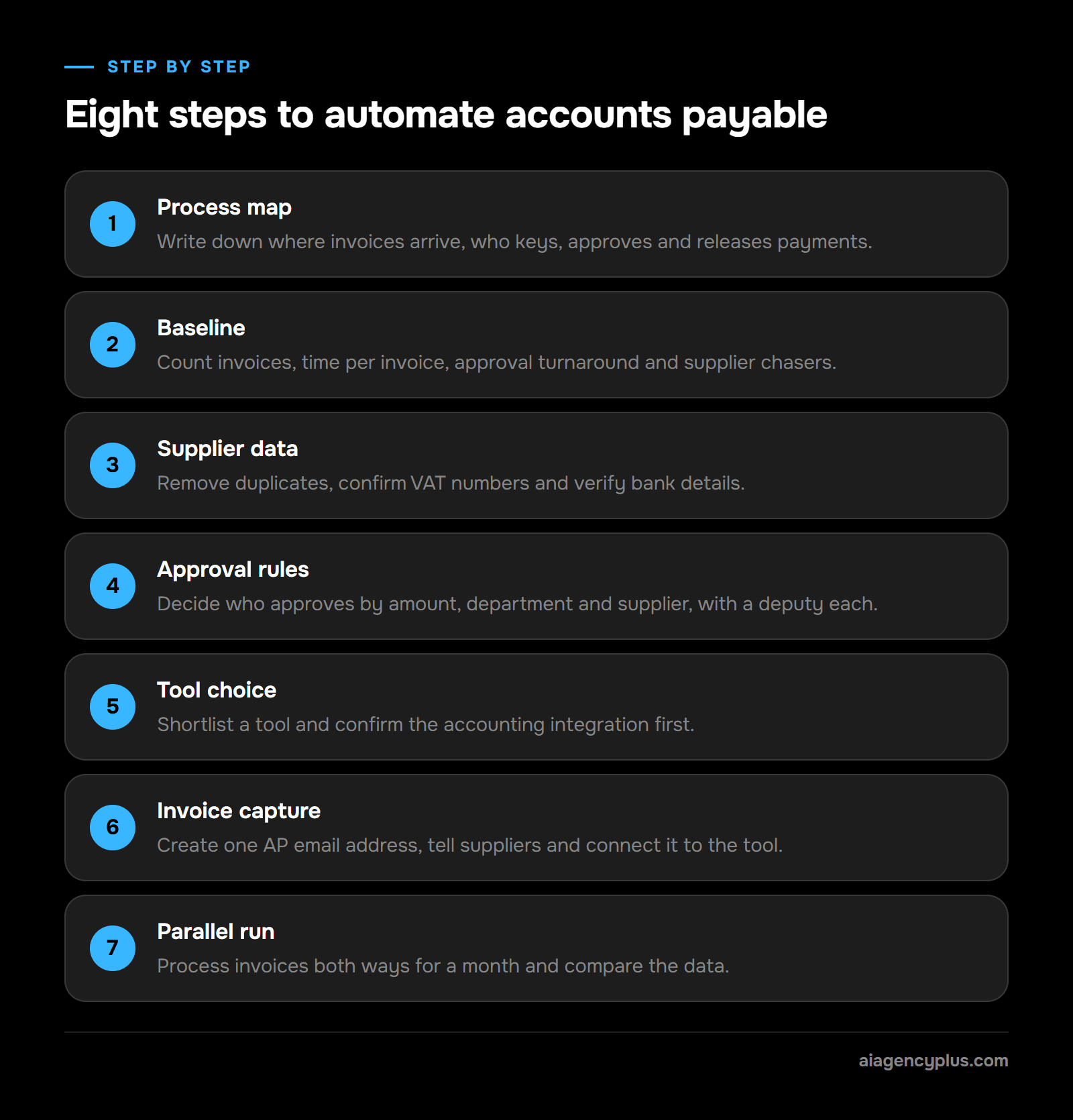
The steps
- Process map. Write down where invoices arrive, who keys them, who approves what and how payments are released. Note where the invoice process gets stuck.
- Baseline. Count invoices per month, time per invoice, approval turnaround and how often suppliers chase. You need these numbers to prove the project worked.
- Supplier data. Remove duplicates, confirm VAT numbers and verify bank details. Automation repeats bad data faster.
- Approval rules. Decide who approves by amount, department and supplier. Name a deputy for every approver.
- Tool choice. Use the checklist in the next section to shortlist an AP automation tool. Confirm the integration with your accounting system before anything else.
- Invoice capture. Create one AP email address, tell suppliers to use it, and connect it to the tool.
- Parallel run. Process invoices both ways for a month. Compare extracted invoice data against what your team keyed.
- Switch-over and review. Move to the new workflow, then review exceptions weekly. Each recurring exception is a rule waiting to be written.
For a wider view of how to sequence projects like this, my AI automation roadmap covers the planning side.
Best practices for implementing AP automation
Implementing AP automation succeeds when one person owns it, the scope starts small and progress is measured against your baseline. These habits make a project easier to sustain.
- One owner. A named person in finance who can change rules without waiting for IT.
- Narrow first scope. One entity, your top suppliers by volume and invoices that arrive by email.
- Targets from the baseline. Track the share of invoices that post without a touch and the average approval time.
- Easy approvals. One tap from where the approver already works, with a deputy behind every approver.
- Monthly rule reviews. For the first quarter, turn each recurring exception into a rule or a supplier instruction.
How does AP automation integrate with ERP, accounting and procurement systems?
AP automation integrates through the accounting system's API, which lets it read your suppliers, nominal codes, tax rates and purchase orders, then write bills back. Check your accounting system's developer documentation for an API, and confirm it is available on your plan. Procurement tools connect the same way so purchase orders are available for matching. Check that the sync runs both ways, and what happens when a record is edited on one side.
How long does implementation take, and can it scale?
Plan in months, not days. Even a single-entity rollout on Xero or QuickBooks with clean data needs two weeks of time logging for the baseline, then set-up and rule writing, then a one-month parallel run before you switch over. In my experience, most of that time goes on rules and testing rather than software set-up. Multi-entity and multi-currency setups take longer because each entity needs its own approval rules, tax codes and bank accounts, so you repeat the rule writing and testing for each entity. For an organisation trading across regions, scaling works if the AP automation system supports separate entities and currencies natively; confirm that before you buy.
Can AP automation solutions handle multi-currency transactions?
Many can, but the detail depends on both the AP platform and your accounting system. The usual pattern is that the platform captures the invoice currency and amount, then posts a foreign-currency bill. Your accounting system then applies the exchange rate and records any gain or loss on payment. That only works if multi-currency is switched on in your accounting system, so check your plan, and test a real foreign-currency invoice during the trial.
If you want a second opinion on whether your invoice volume justifies any of this, Book a Discovery Call.
How do you choose the right AP automation solution for your business?
Choose an AP automation solution by starting with your accounting system and invoice volume, then checking extraction accuracy on your own invoices, approval flexibility, fraud controls and pricing at next year's volume. The best AP automation software for a small business is the one that fits the systems and rules you already have, not the one with the longest feature list.
Accounts payable software features that matter
Feature lists in accounts payable automation software look similar on paper. These are the ones that change day-to-day work.
| Feature | Why it matters | What to test |
|---|---|---|
| Native accounting integration | Reduces rekeying and the risk of broken syncs | Two-way sync with your exact system and plan |
| Extraction accuracy | Drives how much checking remains | Run 50 of your real invoices through a trial |
| Line-item capture | Needed for PO matching and coding | Multi-page invoices with many lines |
| Approval workflow rules | Matches how you actually sign off | Amount thresholds, deputies, escalation |
| Duplicate detection | Helps stop you paying the same invoice twice | Same invoice sent as PDF and paper |
| Audit trail | Evidence for accountants and HMRC | Export the full history of one invoice |
| Multi currency and multi-entity | Needed if you trade abroad or run several companies | Separate entities in one account |
| E-invoicing readiness | HMRC's policy paper VAT: electronic invoicing (28/10/2026) says VAT invoices will have to be issued as e-invoices from April 2029, with Peppol as the core framework | Ask to see a Peppol e-invoice received and posted |
| Pricing model | Per-invoice pricing grows with volume | Quote at today's and next year's volume |
AP automation tools named in vendor guides
Zone & Co, an AP software vendor, names platforms including Dext, BILL, Tipalti, Yooz, Stampli, Medius, Ramp Bill Pay, Quadient and Basware in its guide to AP automation software. They differ in which accounting systems they connect to, whether they serve UK businesses, and whether they are built for small firms or larger multi-entity finance teams, and those details change. Before a platform goes on your shortlist, check three things on the vendor's own site:
- Integrations page. It lists your exact accounting system (Xero, QuickBooks, Sage or your ERP) with a two-way sync.
- UK fit. It handles GBP, UK VAT and UK bank payments, not only US ones.
- Target customer. Its pricing and set-up suit your invoice volume and number of entities.
Then run the tests in the feature table above on your top two or three.
Questions to ask accounts payable software companies
Put these to every vendor on your shortlist:
- Can your platform handle our invoice volume today and our expected volume next year without slowing down or needing a rebuild? Ask for the pricing at both volumes in writing.
- Where is our data stored, and do you offer a UK GDPR data processing agreement?
- What happens to an invoice your system cannot read confidently?
- Can approvers act from a phone without a paid licence?
- Can you receive Peppol e-invoices, and what is your plan for the April 2029 mandate?
- How do we export our data if we leave?
If you are comparing general tools as well as dedicated AP platforms, my list of automation tools for small businesses covers the wider options.
How can a business measure the costs, savings and ROI of AP automation?
Measure AP automation ROI by comparing your baseline cost per invoice with the cost after automation, including software fees, set-up and the time still spent on exceptions. The saving is usually staff time, and can include avoided late payment interest and duplicate payments. Use one test: the cumulative saving over your first year should exceed set-up plus a year of running cost. If it does not, wait until volume grows.
A worked example
The figures below are illustrative assumptions, not measured client results. The exception rate is an assumption for illustration only. The 5 minutes per manual invoice is also an assumption, so use the time your team logged. It is deliberately conservative next to Zone & Co's estimate of 6 to 12 minutes per invoice for data entry alone, so the example understates the manual cost. Swap in your own baseline and the exception rate from your trial.
| Input | Manual | Automated |
|---|---|---|
| Invoices per month | 300 | 300 |
| Minutes per invoice (keying, coding, chasing) | 5 | 1 for straight-through, 5 for exceptions |
| Share needing human handling | All of them | 20% (assumed), so 60 exceptions and 240 straight-through |
| Staff hours per month | 25 | 9 (240 at 1 minute plus 60 at 5 minutes) |
| Hours saved per month | 16 | |
| Value at your loaded hourly cost | 16 hours multiplied by that cost |
If that monthly value comes out well above a tool's monthly cost, the tool would cover itself with room to spare. If it comes out lower, it would not, on time alone. For very low volumes, see "When it does not pay" above.
Industry benchmarks for cost per invoice
These are US-dollar industry figures, not UK SME results. Treat them as a loose sense-check at most, and rely on the baseline your own team logged.
- Average cost. Ardent Partners' AP Metrics that Matter in 2026 report puts the average cost of processing an invoice at $9.90; the report's summary page does not give the sample size.
- Before and after automation. Thomson Reuters, without naming a study, says invoice processing costs can range from $9 to $20 per invoice and can fall to $2 to $4 with automation.
- Manual processing. Zone & Co cites a Goldman Sachs report, date not given, that puts the cost of manually processing an invoice at $9.39 to $22.26.
What to include on the cost side
- Software subscription, often priced per user, per entity or per invoice
- Set-up, data cleaning and rule writing
- Staff time during the parallel run
- Ongoing time on exceptions and supplier queries
I break down typical UK build and running costs in my guide to AI automation cost.
Is AP automation secure, and can it help prevent invoice fraud?
AP automation can be run securely if it is set up with proper controls and the vendor's own security is checked. It can help prevent invoice fraud by checking every invoice the same way. A well-configured tool can flag duplicates, unknown suppliers and changed bank details, enforce approval limits and keep an audit trail; check which of these your shortlist supports. It cannot stop a person approving a fake request, so the human checks around bank detail changes still matter.
The fraud risks in accounts payable
Mandate fraud is when a criminal, usually by email, poses as a company you already deal with and asks for a payment or says their bank details have changed. In AP, that usually arrives as an email that looks like it is from a real supplier, asking you to update their bank details. Other risks to check for are duplicate invoices, fake suppliers and inflated amounts.
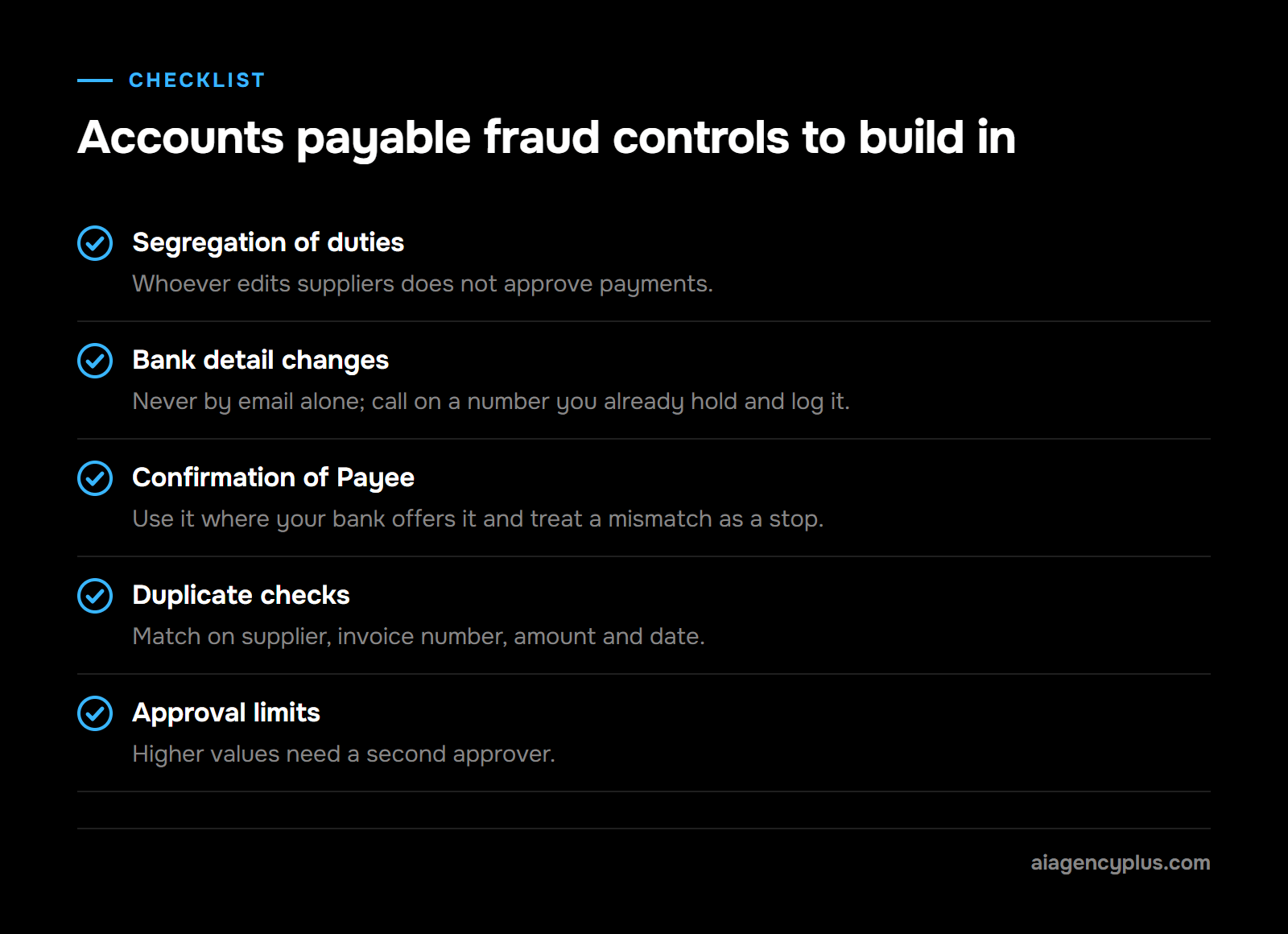
Accounts payable controls to build in
- Segregation of duties. The person who adds or edits a supplier should not be the person who approves payments.
- Bank detail changes. Never accept them by email alone. Call the supplier on a number you already hold, then log the check.
- Confirmation of Payee. Use Confirmation of Payee where your bank offers it, and treat a mismatch as a stop. Confirmation of Payee checks the name on the account against the details you enter before you pay; ask your bank whether it offers it.
- Duplicate checks. Match on supplier, invoice number, amount and date, not invoice number alone.
- Approval limits. Higher values need a second approver.
Automation systems can enforce the duplicate checks, approval limits and segregation rules on every invoice. The phone call on a bank detail change stays with a person.
Regulatory compliance and record keeping
According to HMRC's VAT Notice 700/22, VAT-registered businesses, unless exempt, must keep digital records and file VAT returns using compatible software. AP automation that posts directly into compatible accounting software supports this. Limited companies must keep accounting records for 6 years from the end of the last financial year they relate to, or longer in some cases, such as long-life assets or an open HMRC check, so check the platform's retention and export options.
Supplier invoices often contain personal data, such as contact names and sole traders' details, so the tool also needs to handle them in line with UK GDPR. If you choose a cloud-based AP platform, ask where invoices and audit history are stored and who can access them.
What mistakes should you avoid in an AP automation project?
The biggest mistakes in an AP automation project are automating a messy process, skipping the baseline, trusting extraction without checks, letting payments run without human sign-off, and buying for features you will never use. Each one is avoidable with a little planning before any software is switched on.
- Automating the mess. If approval rules live in people's heads, write them down first. Software only enforces rules that exist.
- No baseline. Without before-and-after numbers you cannot show the project worked or spot where it is falling short.
- Blind trust in extraction. Spot-check posted bills weekly for the first few months, especially VAT and line totals.
- Fully automated payments. Keep a person signing off every payment run. The saving from removing that step is small; the risk is not.
- Ignoring suppliers. Tell them the new AP email address and how to send invoices. Capture problems can start with suppliers using old addresses.
- Buying for scale you do not have. AP systems built for large companies come with a large set-up job. Match the tool to the next two years, not the next ten.
- No owner. Someone in finance must own the exception queue and the automated steps behind it. Otherwise the queue fills up quietly.
If you are unsure whether AP is the right first project, my guide on which business processes you can automate with AI helps you compare candidates.
How does AI Agency Plus build an automated accounts payable workflow?
I build AP workflows around the accounting system you already use, so your team keeps the tools they know and the automation handles the clerical steps in between. Where an off-the-shelf AP platform fits, I will say so. Where your rules or systems do not suit one, I build a custom workflow in n8n.
Off-the-shelf AP tools or custom workflow automation?
An off-the-shelf AP solution suits a standard process on a well-supported accounting system. Custom workflow automation suits approval rules that do not fit a platform's options, approvals that need to live in Teams or Slack, or AP that has to connect to other processes you already run. I look at your volumes and rules first, then recommend one or the other.
What a build would do
- Watches your AP inbox and pulls every attachment into one queue.
- Uses an AI model to extract supplier, invoice number, dates, net, VAT, total and line items, and flags low-confidence or incomplete reads for a person to check.
- Checks the supplier against your accounting system, runs duplicate checks and flags any change in bank details for a phone verification.
- Matches against purchase orders where you use them.
- Sends the approver a short message in Teams, Slack or email with the invoice attached and options to approve or query, then escalates to the deputy if it sits too long.
- Posts the approved bill to Xero, QuickBooks or Sage with the suggested GL account and tax code.
- Leaves payment release with a named person, and logs every step for the audit trail.
What you do next
We start with a short review of your current AP process and volumes. If the numbers do not justify automation yet, I will tell you and suggest what to tidy up first.
If you want to know whether it makes sense for your business, Book a Discovery Call.
Frequently asked questions
What is the difference between AP and AR automation?
AP automation handles money you owe: supplier invoices, approvals and payments. AR automation handles money owed to you: raising sales invoices, sending reminders and matching receipts. In my experience, AP is often a sensible first project because supplier invoices arrive in many formats and need approval, which takes manual time.
Is accounts payable automation worth it for a small business?
It is worth it when invoice volume, approval delays or fraud risk are causing real cost. To find out, apply the test in the ROI section to your own baseline: the saving over your first year should exceed set-up plus a year of running cost.
Can AP automation pay suppliers automatically?
Many platforms can prepare payment runs and send them to your bank or a payments provider. I recommend keeping a person signing off every payment run. The time saved by removing that step is small compared with the risk of paying a fraudulent or incorrect invoice.
Do I need purchase orders to automate accounts payable?
No. Purchase orders let the system match invoices to what was ordered, which catches price and quantity errors. Without them, automation still captures, extracts, checks for duplicates, routes approvals and posts bills, and the approver becomes the main check.
Does AP automation replace a bookkeeper?
It replaces the keying and chasing, not the judgement. Someone still needs to handle exceptions, query suppliers, review coding and sign off payments. The bookkeeper's time can shift from data entry to review and reconciliation.