

What is an AI virtual receptionist? It is software that answers your business phone in a natural-sounding voice, at any hour. It works out what callers want, answers common questions, books appointments, takes messages and passes urgent or awkward calls to a person by rules you set. A plain virtual receptionist is usually a remote human.
What is an AI virtual receptionist?
An AI virtual receptionist does the front-desk job over the phone, with nobody sitting at the desk. You will also see it called an AI phone receptionist, an AI-powered receptionist or an automated virtual receptionist. They describe the same thing.
If you are comparing services rather than learning the term, my AI virtual receptionist page sets out what we build.
Older 'electronic receptionist' systems were press-1-for-sales menus, known as IVR (interactive voice response). An AI receptionist lets the caller say what they need in their own words and responds to that.
AI receptionist vs virtual receptionist: what's the difference?
The difference is who answers. A virtual receptionist is usually a person working remotely for an outsourced answering company, often from a shared contact centre. An AI receptionist is software: it answers several calls at once and works through the night, following the rules you give it.
What does a virtual receptionist do?
A virtual receptionist answers calls in your business name, takes messages, transfers callers and sometimes books appointments. Cover is normally set hours on a monthly plan with an allowance of calls or minutes. Good ones bring human judgement; the trade-offs are usually price per call and set hours.
How does an AI virtual receptionist work?
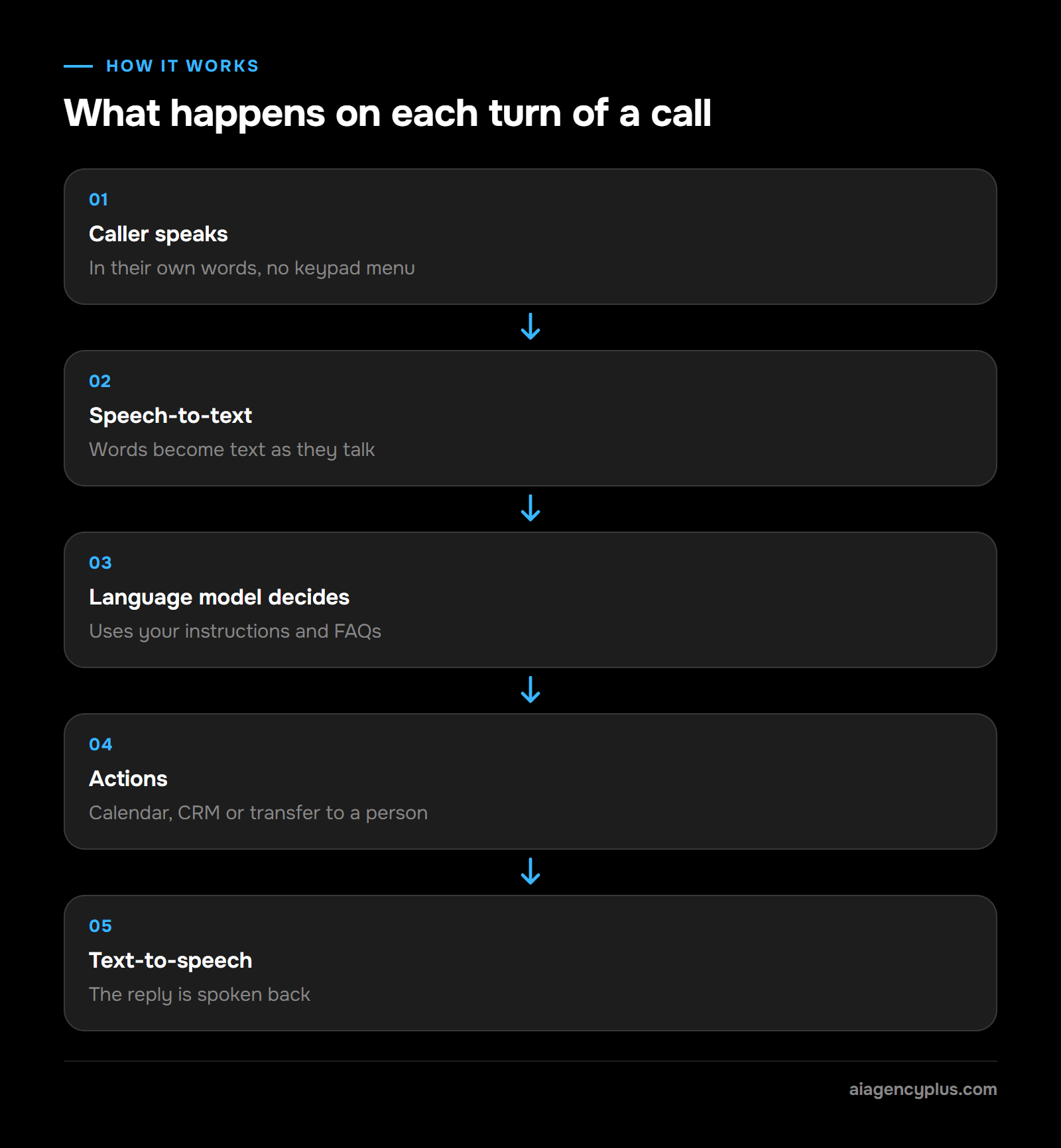
An AI virtual receptionist runs the same loop on every turn of a call. It turns the caller's speech into text, a large language model works out what they want and what to say, and a synthetic voice speaks the reply. Between turns it can check a calendar, look up a record or start a handover to a person.
The parts of the system
- Speech-to-text (STT): turns the caller's words into text as they speak.
- Large language model (LLM): reads the conversation so far, plus your instructions and FAQs, and decides the next reply or action.
- Actions: checks the calendar, writes to the CRM or transfers the call, through connections set up during the build.
- Text-to-speech (TTS): turns the reply into a natural-sounding voice.
OpenAI's gpt-realtime, released on 28/08/2025, is a speech-to-speech model that handles audio in and audio out in one step. OpenAI says this cuts the delay of chaining separate speech-to-text and text-to-speech models. In my experience, the pause before each reply is most of what makes a call feel robotic.
What makes it your receptionist
The underlying model is general purpose. What makes it yours is the brief it works from: your services, prices, opening hours, service area and escalation rules, written as a prompt and a short knowledge base. I have published a worked UK receptionist prompt if you want to see one.
It does not learn by itself between calls. It improves when someone reads the call logs and tightens the instructions, which is why tuning after launch matters as much as the build.
How do you set up an AI virtual receptionist?
Setting up an AI virtual receptionist takes five steps: agree the brief and escalation rules, connect your calendar or CRM, forward calls from your existing number, make test calls, then tune against real call logs. You keep your number throughout. Calls are forwarded to the agent rather than moved to a new line.
The five steps
- Agree the brief and escalation rules. Write down your services, prices, hours, service area and the questions callers ask most. Then agree which calls go to a person, who gets them and what happens if they do not answer.
- Connect the calendar or CRM. Decide what the agent may write as well as read. The integration section below covers this in more detail.
- Forward calls from your existing number. Depending on your phone system, you can forward all calls, out-of-hours calls only or calls nobody picks up.
- Make test calls. Play your own customers, including awkward ones, an emergency and someone who asks for a person.
- Tune against real call logs. Read the summaries and transcripts, then tighten the instructions wherever the agent hesitated or guessed.
The last step is ongoing. The first weeks of real calls show gaps no test call will, so plan time to review them.
What tasks can an AI virtual receptionist handle?
An AI receptionist answers calls, answers routine questions, books and changes appointments, takes detailed messages, qualifies new enquiries and routes calls to the right person. The common thread is that each task follows a pattern you can write down. If a call type needs judgement you cannot put into rules, keep it with a person.
The everyday jobs
- Answer every call in your business name, including several at once.
- Answer the questions you get every week: hours, prices, service area, parking, what to bring.
- Book, move and cancel appointments in your calendar or booking system.
- Take a message that records who called, what they wanted and what they expect next.
- Qualify new enquiries (intake): job type, postcode, budget and urgency.
- Route calls: transfer to a person, or escalate an emergency to whoever is on call.
- Send follow-ups such as booking confirmations or reminders, where the product supports them.
That last one varies by product. Some send SMS confirmations to callers and others send a call summary to you by email, so check which you need before you choose.
Which businesses get most from one
The best fit is a business with lots of calls, or calls that arrive when nobody can pick up. Dental and medical practices, law firms, letting and estate agents, trades, cleaning companies and managed IT providers all fit that pattern.
What are the main benefits of an AI virtual receptionist for small businesses?
The main benefits of using an AI virtual receptionist are cover outside office hours, no engaged tone when calls bunch up, consistent answers and fewer missed enquiries. It also takes routine calls off your staff, so the people you employ spend their time on work that needs them. Whether that is worth paying for depends on your call pattern.
Cover when nobody is at the desk
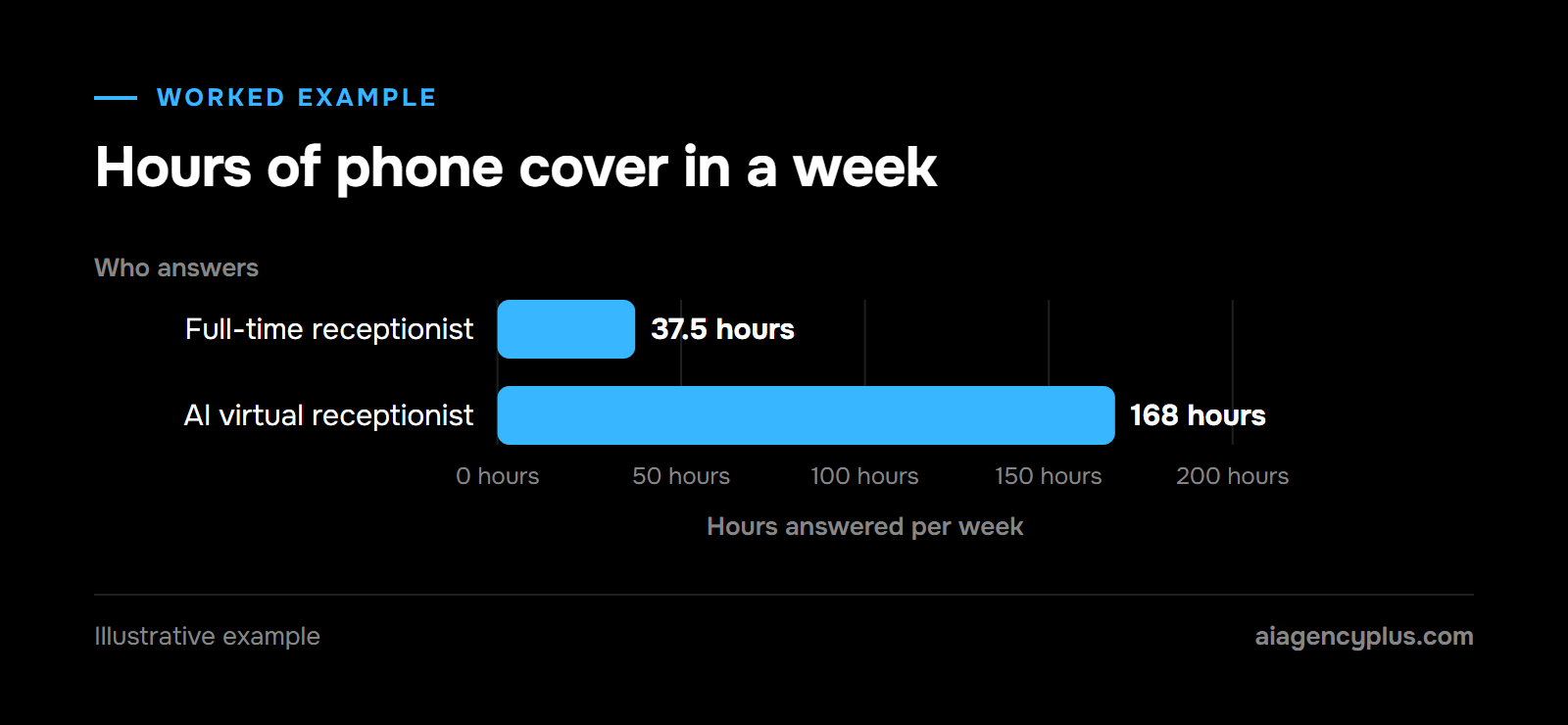
A full-time receptionist on 37.5 hours a week covers 37.5 of the 168 hours in a week. That leaves about 130 hours when a call goes to voicemail, and some callers will ring off rather than leave one. An AI receptionist can answer in all 168.
Several calls at once
A person handles one call at a time. Software answers the second, third and fourth caller too, so a busy Monday morning stops going to the engaged tone.
The same answer every time
It gives the price, policy or opening time you set, on every call. When one changes, you update it once.
Are AI receptionists worth it?
They are worth it when the calls you miss cost you work: lost enquiries, out-of-hours emergencies, a front desk swamped at peak times. They are a poor buy if you take a handful of calls a week, or if most calls are complaints or advice that needs a qualified person.
Count your missed and out-of-hours calls for a fortnight before you buy anything. Then put a value on them.
Nextiva sets out an illustrative method: missed calls × share that are qualified leads × close rate × average first sale. Its example is 20 × 30% × 25% × $500 = $750 per month, in US dollars.
Nextiva's own caveat applies: the $750 'represents estimated revenue associated with missed calls, not guaranteed lost revenue or profit'. Compare your figure with the monthly price, not with a salary.
I go further into the case for and against in five benefits of AI receptionists for small businesses.
Where does a human still need to step in?
A person needs to step in for emergencies, distressed or angry callers, complaints, anything needing professional advice and anyone who simply asks for a human. A well-built AI receptionist spots these calls by rules agreed in advance and hands them over, rather than trying to handle them itself.
Calls to hand to a person
- Safety emergencies, such as a smell of gas or a burst pipe.
- Distressed, vulnerable or angry callers.
- Complaints and disputes.
- Advice that needs a qualified person: legal, medical or financial.
- Anyone who asks for a person.
Design the handover, too
Decide who gets each type of call, what happens if they do not answer, and how the agent confirms the handover worked. A handover that rings an unanswered mobile is no better than voicemail.
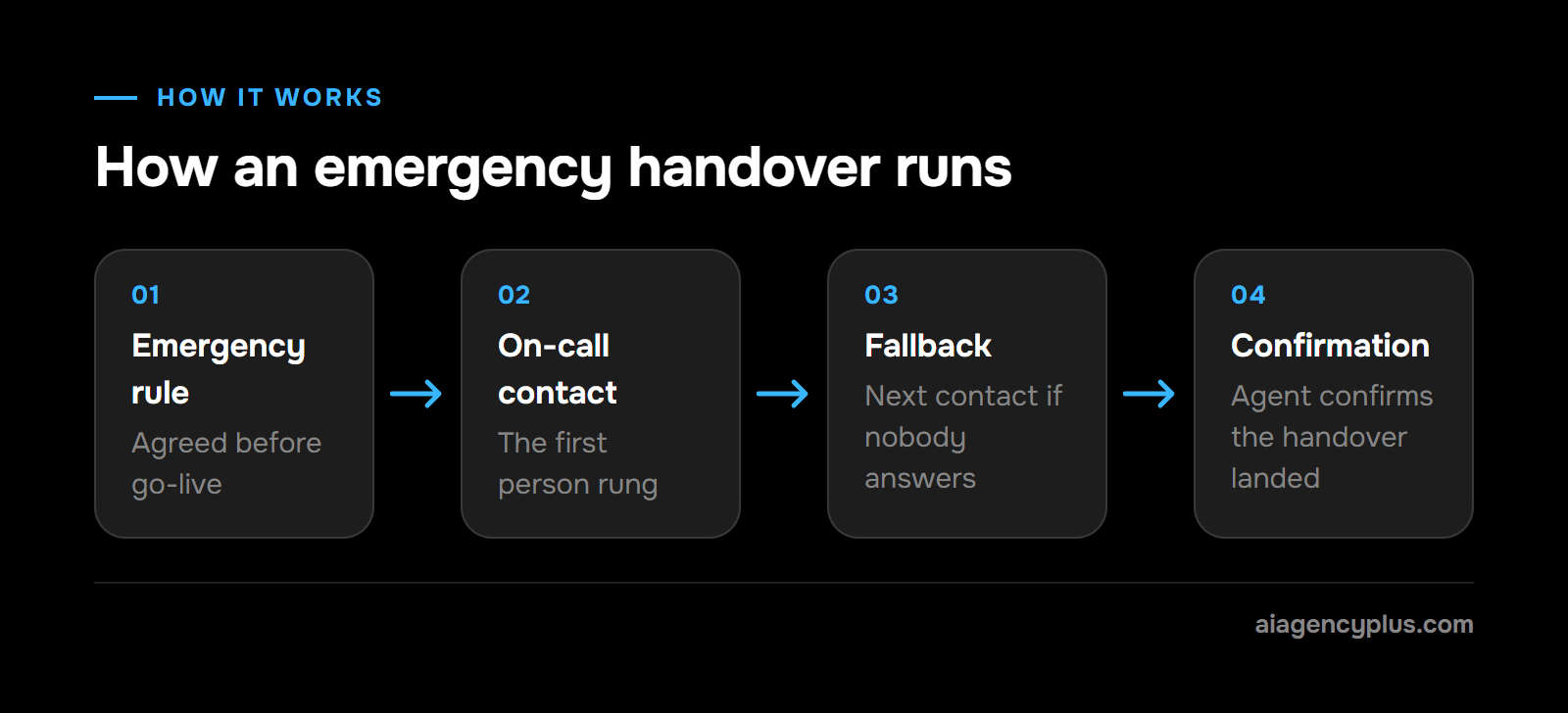
The chain runs in order. An emergency rule is triggered, the on-call contact is rung, a fallback contact is tried if nobody answers, and the agent confirms the handover landed.
Some calls should get safety instructions before anything else. A caller who smells gas, for example, needs ventilation advice and the gas emergency number, never a booking slot.
Telling callers it is AI
Callers should be able to find out they are talking to software. Recording, data protection and disclosure all carry UK rules, which I cover in is it legal to have AI answer your business calls in the UK.
AI vs human receptionist: what does each cost?
An AI receptionist is usually a monthly subscription plus a one-off setup fee. An in-house receptionist aged 21 or over costs at least the National Living Wage, plus employer National Insurance, pension contributions, holiday cover and recruitment. The two cover very different hours, so compare like with like before comparing totals.
A worked example (illustrative)
Take a full-time receptionist aged 21 or over on the National Living Wage, £12.71 an hour from 01/04/2026. Assume a 37.5-hour week. Over 52 weeks, by my arithmetic, that is £24,784.50 a year in gross pay, before employer National Insurance, pension or holiday cover. It is a floor, not a typical salary.
For comparison, AI Agency Plus's out-of-hours service starts at £349 a month plus VAT, which by my arithmetic is £4,188 a year plus VAT. The build fee, from £1,500 plus VAT, is waived on a 12-month commitment.
The caveat matters. These two do different jobs. The person runs the walk-in desk, the post and judgement calls in office hours; an AI receptionist can cover the hours outside them, worked out under benefits above. For most SMEs I speak to, the AI is up against voicemail and missed calls, and replacing a salary is rarely the reason to buy.
What the wider market charges
For the wider market, Retell AI puts human virtual receptionist services at about $1.20 to $2.50 a minute, or about $250 a month for 50 minutes to $1,700+ for 500. Aircall says 'AI virtual receptionist software typically starts under $100 per month for base subscriptions'.
Both are US-dollar figures from companies that sell AI phone software. Treat them as rough ranges rather than UK quotes.
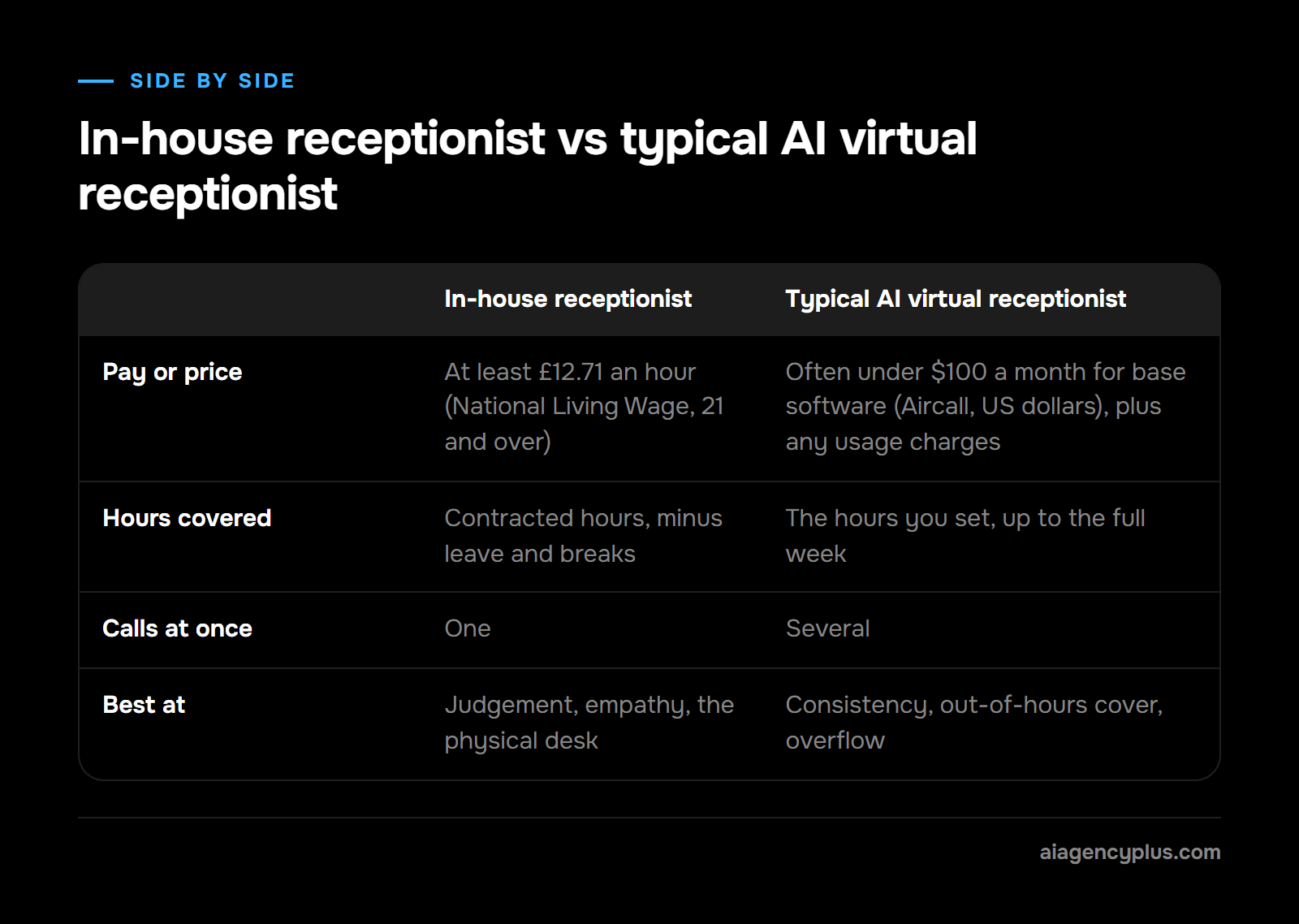
The table compares an in-house receptionist with AI virtual receptionists in general. Our own out-of-hours price is the figure above.
| Cost factor | In-house receptionist | Typical AI virtual receptionist |
|---|---|---|
| Pay or price | At least £12.71 an hour (National Living Wage, 21 and over) | Often under $100 a month for base software (Aircall, US dollars), plus any usage charges |
| Extra costs | Employer National Insurance, pension, holiday cover, recruitment | Setup fees, usage charges and integrations, varying by provider |
| Hours covered | Contracted hours, minus leave and breaks | The hours you set, up to the full week |
| Calls at once | One | Several |
| Best at | Judgement, empathy, the physical desk | Consistency, out-of-hours cover, overflow |
Watch for usage pricing
Some providers charge per minute or per call on top of a subscription, so a busy month costs more. Two published UK price structures show how it works.
- BT sells its AI Receptionist in bundles 'from 100 to 14,000 minutes per month' with per-minute overage options. The admin is emailed at 80% and 100% of the allowance, and the 'service turns off at 100% unless more minutes or overage enabled'.
- IONOS AI Receptionist plans come with 30 calls included, then £0.49 per call, or 100 calls included, then £0.39 per call, excluding VAT.
Ask what happens to the bill if your call volume doubles.
How does an AI virtual receptionist connect to your CRM and calendar?
An AI receptionist integrates with your CRM through the CRM's API or an automation tool such as n8n, Make or Zapier. During or after a call it looks up the caller, creates or updates a contact and logs a call summary. Calendars such as Google Calendar and Outlook connect the same way, so bookings land in the diary you already use.
What usually connects
- Calendars: Google Calendar and Microsoft Outlook.
- CRMs: HubSpot and Salesforce, among others with an API.
- Job and booking systems used by trades and clinics, where they offer an API.
- Email, for call summaries and handover notes.
Questions to ask before you connect anything
Ask what the agent can write as well as read. Agree which fields it fills, which records it may change, and what happens if your system is down mid-call.
If your booking software has no API, the agent can still take the booking details and send them to you to enter. It is slower, and it works.
Languages and HubSpot together
A multilingual receptionist that syncs with HubSpot is possible, because the two are separate pieces. Language comes from the voice model and the sync is an integration, so test each on its own. Many current speech models handle languages such as French and Spanish; judge them on a test call in your callers' language.
What should you check before you choose one?
Before you choose an AI virtual receptionist, check seven things: how it escalates, what it can write to your systems, how follow-ups reach callers, how usage is priced, how data is handled, whether it says it is AI, and how it sounds in your callers' language. Each is covered above; here they are together.
- Escalation: who gets which call, the fallback chain if they do not answer, and confirmation that the handover landed.
- Calendar and CRM: what it can write as well as read, and what happens if your system is down mid-call.
- Follow-ups: SMS confirmations to callers or email summaries to you, whichever you need.
- Usage pricing: per-minute or per-call charges, and what happens if volume doubles.
- Data: where recordings and transcripts are stored, for how long, and who processes them under UK GDPR.
- AI disclosure: it says it is AI if asked and passes callers to a person on request.
- Language: a test call in your callers' language, including your local place names.
The short version
An AI virtual receptionist is a voice agent that answers, books, logs and escalates by your rules, at any hour. It earns its place when missed and out-of-hours calls cost you work, and a person still handles the calls that need judgement.
What does an AI virtual receptionist from AI Agency Plus include?
Our version is an AI answering service built for out-of-hours calls. It answers your business phone outside working hours (evenings, nights, weekends and holidays), escalates genuine emergencies to your on-call contact and logs everything else for the next working day. The escalation rules are agreed with you before anything goes live.
What happens on a call
- The agent answers in your business name and finds out what the caller needs.
- If it is an emergency under your agreed rules, it escalates to your on-call contact and confirms the handover landed. If that person does not answer, it moves down a fallback chain.
- On our trades service, and only where you want it to, it books jobs straight into the booking system or calendar you already use. You choose which jobs it books.
- Everything else is captured: who called, what they wanted and what they expect to happen next.
Those non-urgent calls arrive as summaries in your email, 'waiting in your inbox at 8am rather than as a voicemail nobody transcribes'. Texting callers stays with your own systems.
Honesty is part of the build: 'If asked, it says what it is. Callers who want a person get routed to one.'
On our trades service, a suspected gas leak is never booked: 'The caller is told to ventilate, avoid switches and naked flames, and ring the National Gas Emergency Service on 0800 111 999', and then you are told.
Price and timeline
It starts at £349 a month plus VAT, with a one-off build fee from £1,500 plus VAT, waived on a 12-month commitment. The timeline, as our trades page puts it: 'Around three weeks to go live, then four to eight weeks of tuning against real calls.'
To hear it before you speak to me, ring the demo line on our AI answering service page. Play your own customer: book something, change it, then ask for something awkward and listen to how the agent, Amy, escalates.
If that sounds like your phone, Book a Discovery Call and I will tell you plainly whether it fits.
Frequently asked questions
Is there an AI receptionist available in the UK?
Yes. BT sells an AI Receptionist with RingCentral, priced in monthly minute bundles, and RingCentral sells its own AI Receptionist in the UK. IONOS AI Receptionist charges per call above an included number of calls, and AI Agency Plus is another UK option. Before you choose, check three things: the provider handles call data under UK GDPR, the agent tells callers it is AI if asked, and it can hand calls to a person.
Is an AI receptionist better than a virtual receptionist?
It is better for volume and hours: it answers several calls at once, around the clock, usually for a monthly price. A human virtual receptionist is better for calls that need judgement, warmth or negotiation. A common set-up is AI for out-of-hours calls and overflow, with people for the rest.
Which AI virtual receptionist has the most human-like voice?
Pick the one with the shortest pause before each reply on a demo call: in my experience that pause decides whether a call feels human more than the voice itself does. The voice comes from the speech model the provider uses, and the same model sounds different with different scripts. On the demo line, also judge how it copes when you interrupt and how it says your local place names.
Is my customer data safe with an AI receptionist?
It can be, if the provider treats call recordings and transcripts as personal data under UK GDPR. Ask where data is stored, how long recordings are kept, who can access them and which other companies process the audio. HIPAA, which some US providers mention, is US health law. UK businesses work under UK GDPR and the Data Protection Act 2018.
Will an AI receptionist replace my receptionist?
Usually not. In most set-ups it covers the hours and the overflow a person cannot, and takes repetitive calls off their plate. Your receptionist keeps the walk-in desk, the awkward calls and the judgement.