

AI for accountants tends to save time on repeatable admin: chasing missing records, reading and filing documents, drafting routine emails, summarising calls and answering out-of-hours enquiries. In a UK practice it works best inside approved tools, with a qualified person reviewing every output. Keep confidential client data out of public AI chatbots, as ICAEW advises.
What does AI for accountants mean in a UK practice in 2026?
In a small UK practice, AI for accountants means software that reads, sorts and drafts so your team checks work rather than typing it. Generative AI drafts emails, summarises calls and pulls figures from documents. Automation moves that work between your inbox, practice management system and bookkeeping software. A qualified person still reviews the output and signs it off.
How many practices use AI?
Adoption figures vary with how a survey asks the question, and the best-known ones are not UK-only. Daily use is lower than trial use. In a study reported by MIT Sloan, researchers surveyed 277 accountants and about 10% were using AI in their daily routines.
Measured results are scarcer than opinions. The MIT Sloan-reported study measured where accountants' time moved, set out below. The saving in this guide's worked example is illustrative, not one of these measurements.
Two kinds of tool, two kinds of risk
Generative AI writes text, so its main risk is a confident mistake. Rules-based automation follows steps you define, so its main risk is a step you forgot. The useful setups combine both: a rule decides what happens next, and the AI does the reading or drafting in between.
Research shows both sides. In the research reported by MIT Sloan, firm data showed about 8.5% of accountant time moving from routine data entry to higher-value work. The same researchers also surveyed 277 accountants, and 62% of them were worried about errors and accuracy in AI-generated reporting. Every setup in this guide keeps a person checking the output for that reason.
AI bookkeeping is a familiar example of artificial intelligence in accounting. Bank feeds suggest categories and match transactions for reconciliation, and a person approves them. That pattern of suggest, then approve, is the safe model for everything else in this guide.
This guide is for partners and practice managers in firms of 1 to 20 people. If you would rather talk your own practice through, Book a Discovery Call.
Where does AI save real hours in an accountancy practice?
AI tends to save hours on repeatable, low-judgement tasks: chasing missing records, reading and filing client documents, drafting routine emails and summarising calls or meetings. Researchers reported by MIT Sloan found a "reallocation of approximately 8.5% of accountant time from routine data entry toward high-value tasks". Start with those tasks, and leave anything that needs professional judgement with your team.
The tasks worth starting with
- Records chasers: AI drafts the reminder, a person approves it, a rule sends it, and a person handles the replies that need thought.
- Document intake: AI reads receipts, invoices and statements, names them and files them; a person checks anything it is unsure of. See the invoice automation guide and accounts payable automation for the same pattern in a client's own business.
- Email drafting: AI writes first drafts of routine replies in your house tone; staff edit and send.
- Call and meeting notes: AI produces a summary and action list for the client record; a person confirms it.
- Reconciliation suggestions: the bookkeeping software proposes matches; a person approves them.
A worked example: estimating the saving (illustrative)
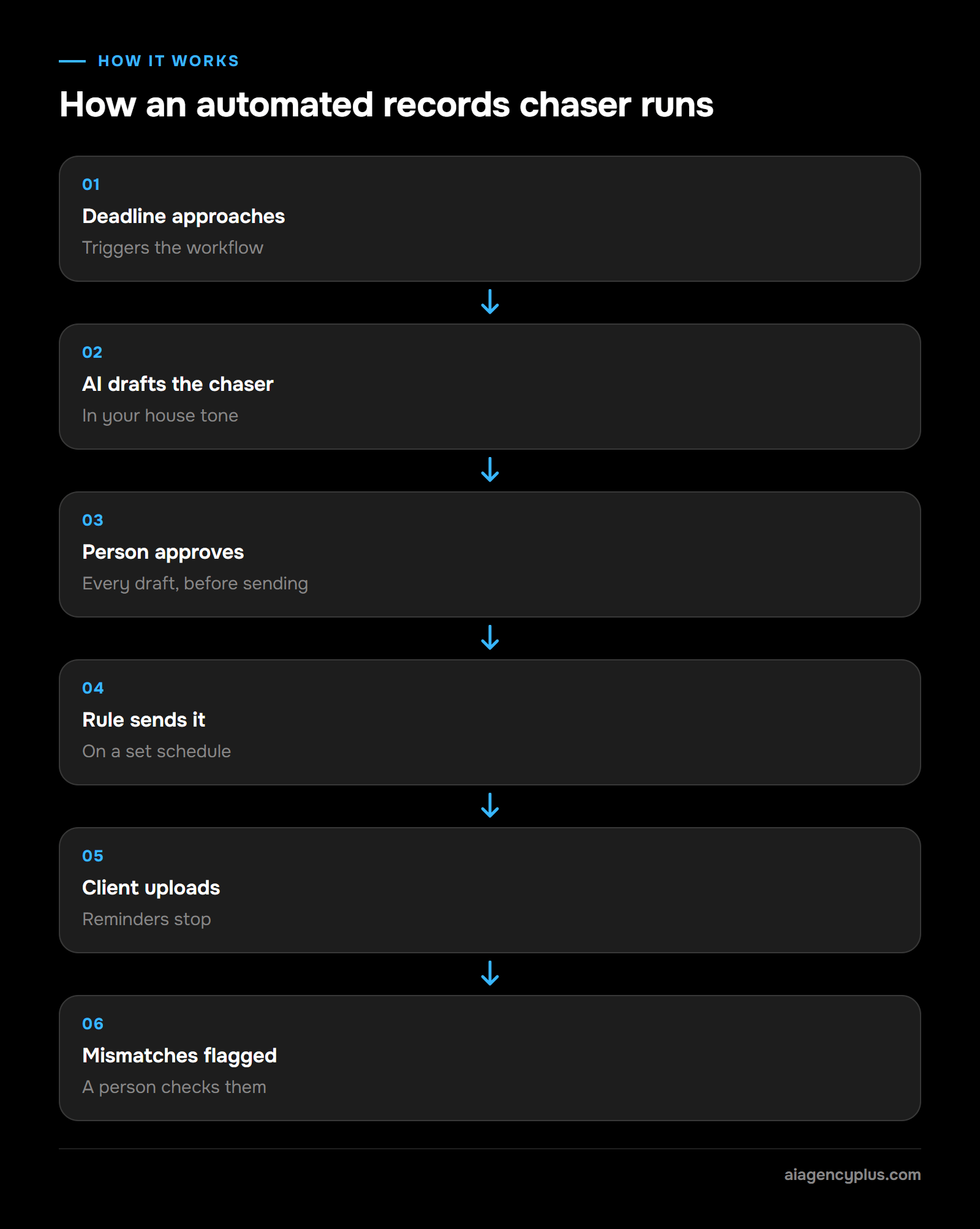
Here is how to estimate a saving before you buy anything. The inputs are illustrative, not measured from any practice, so swap in your own. The flow: a deadline triggers the workflow, the AI drafts a chaser in your tone, a person approves it, a rule sends it, the client uploads, and the system flags any upload that does not match for a person to check.
- Inputs: 60 records chasers a month at 8 minutes each to find the client, write, send and log. That is 480 minutes, or 8 hours.
- After automation: the system drafts each chaser, a person spends 2 minutes reviewing and approving it, and a rule sends it. That is 120 minutes, or 2 hours.
- Expected output: about 6 hours a month back, before setup and running costs.
To check it, time ten real chasers this week. If your average is well under 8 minutes, the saving shrinks and this may not be your first project. For ideas beyond accountancy, see which business processes you can automate with AI.
How does Making Tax Digital for Income Tax change an accountant's workload?
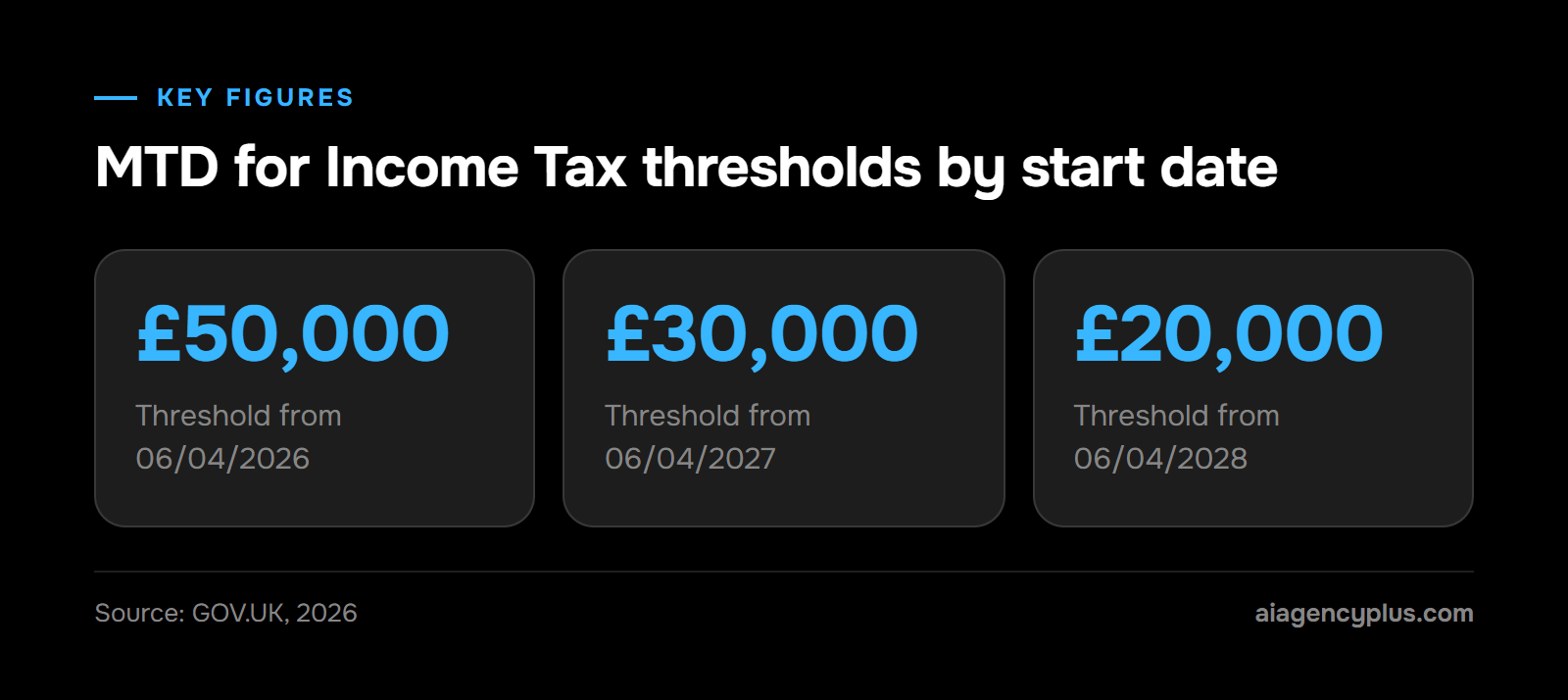
Making Tax Digital for Income Tax moves sole traders and landlords above an income threshold to digital records and quarterly updates, on top of the year-end return. Each affected client now brings more deadlines, more chasers and more reviews. The threshold falls each year from 2026 to 2028, so the number of clients affected keeps rising.
According to GOV.UK guidance (read 14/11/2026), MTD for Income Tax applies from 06/04/2026 above £50,000 of qualifying income, from 06/04/2027 above £30,000 and from 06/04/2028 above £20,000.
HMRC estimates that around 1,077,000 more sole traders and landlords will join from 06/04/2027, based on its analysis of 2024 to 2025 Self Assessment returns (HMRC on GOV.UK, read the same day). Expect some of them to be keeping quarterly digital records for the first time, which usually means more chasing.
That figure covers the April 2027 group only. The over-£50,000 group joined on 06/04/2026 and is already sending quarterly updates.
Where automation helps with MTD
Quarterly cycles suit automation because the steps repeat. A scheduled workflow can remind clients before each quarter ends, check whether bank feeds and receipts have arrived, and flag the clients who are behind. Your team then spends its time on the clients who need help.
Keep the submission itself as a human step. A person reviews the figures and submits through your MTD-compatible software.
Is it safe to put client data into generative AI? What ICAEW says
Not into a public tool. ICAEW's Generative AI guide (read 14/11/2026) says respecting client confidentiality means "not loading confidential information into public Generative AI tools". Use tools your practice has approved, on business terms that cover where data is stored, who can see it and whether it trains the provider's models.
Free chatbots are easy for staff to reach, so check what your team already uses before you write the policy.
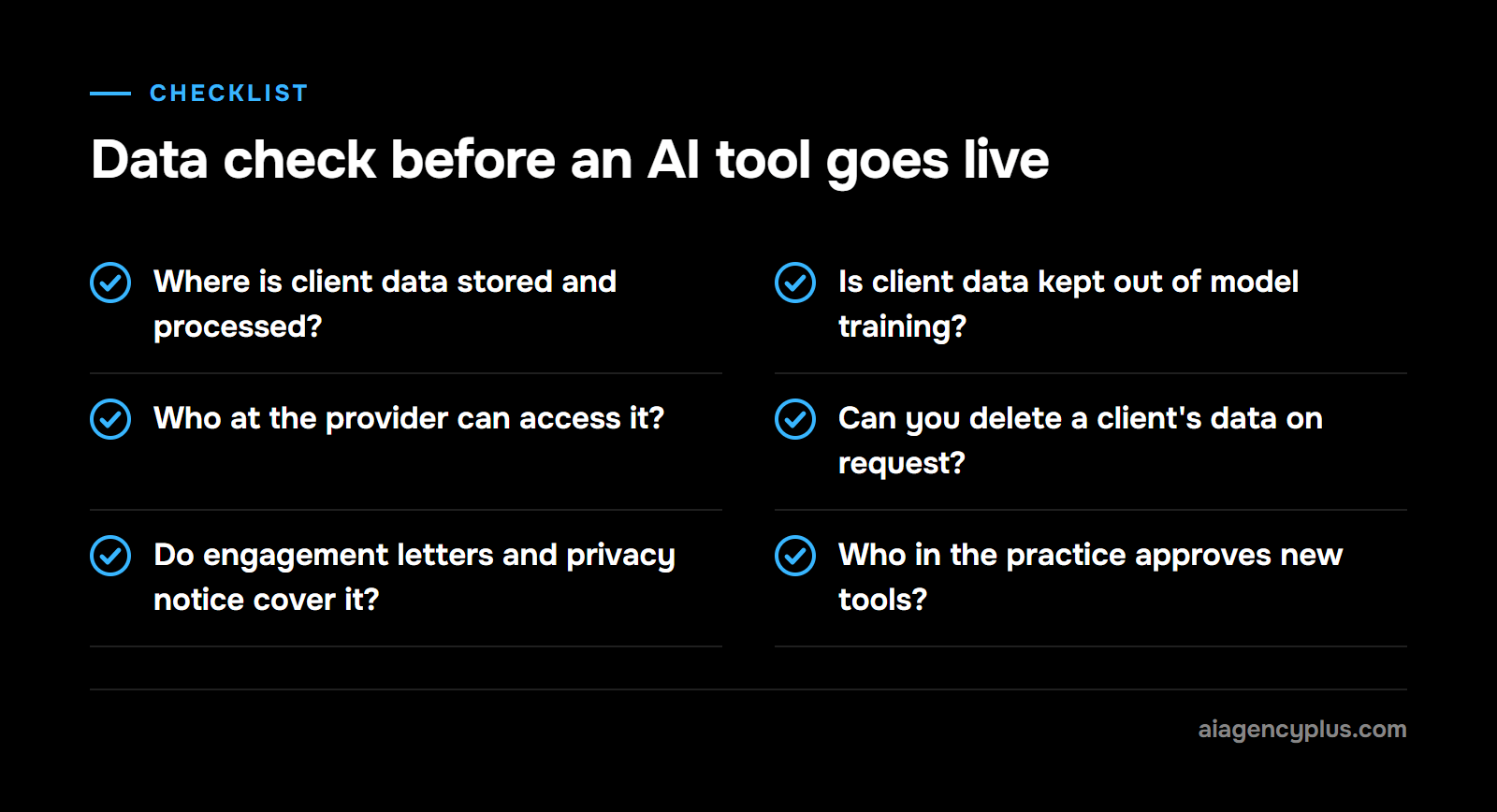
A data check before any tool goes live
- Where is client data stored and processed?
- Do the business terms say client data is not used to train the provider's models?
- Who at the provider can access it, and is access logged?
- Can you delete a client's data on request?
- Do your engagement letters and privacy notice cover this processing?
- Who in the practice approves a new tool before staff use it?
Removing names helps, but it is not a full answer. A unique set of figures, dates and a postcode can still identify a client. When in doubt, treat the data as confidential.
How do PCRT rules apply when a practice uses AI?
Professional Conduct in Relation to Taxation (PCRT) applies whether a person or a tool drafts the work. It is mandatory for members advising on tax, and ICAEW's PCRT page (read 14/11/2026) lists topical guidance on applying PCRT to the ethical use of AI tools. The adviser stays responsible for what reaches the client and HMRC.
Day to day, AI use sits under PCRT's existing fundamental principles. Professional competence and due care means checking AI output before relying on it; confidentiality means client data goes only into approved tools.
ICAEW's topical guidance on PCRT and AI tools, published on 19/01/2026, is direct: "Members are ultimately responsible for any work they produce", whether or not AI tools were used. The checklist below follows from that.
Keeping judgement with the accountant
- Review every AI draft of advice before it leaves the practice.
- Record who reviewed it and when.
- Check figures against the source records, never against the AI's summary of them.
- Tell clients how you use AI where it touches their work.
In practice, AI produces a first draft and a person decides. That rule is sensible for routine letters and essential for anything a client will rely on.
Which front-office tasks can a practice automate: calls, chasers and onboarding?
Front-office work is often the easiest place to start because it is high volume and low risk. Calls, chasers and new-client onboarding follow the same steps every time. Automation handles the routine part and passes anything unusual to a named person, so the team spends less time on admin and more on client work.
Client calls
An AI answering service can pick up out-of-hours and overflow calls, take a message, answer set questions such as opening hours, and book a callback. It should not discuss a client's tax position. For the wider picture, see the guide to call handling for small businesses.
Chasers
Reminders for records, signed engagement letters and fee payments can run on a schedule and stop when the client responds. A person sees a daily list of who is still outstanding.
Onboarding
A new-client form can collect details, request ID documents, create the record in your practice management system and set up folders. Anti-money laundering checks and the decision to accept the client stay with your team.
How should a small practice start with AI? A 30-day plan
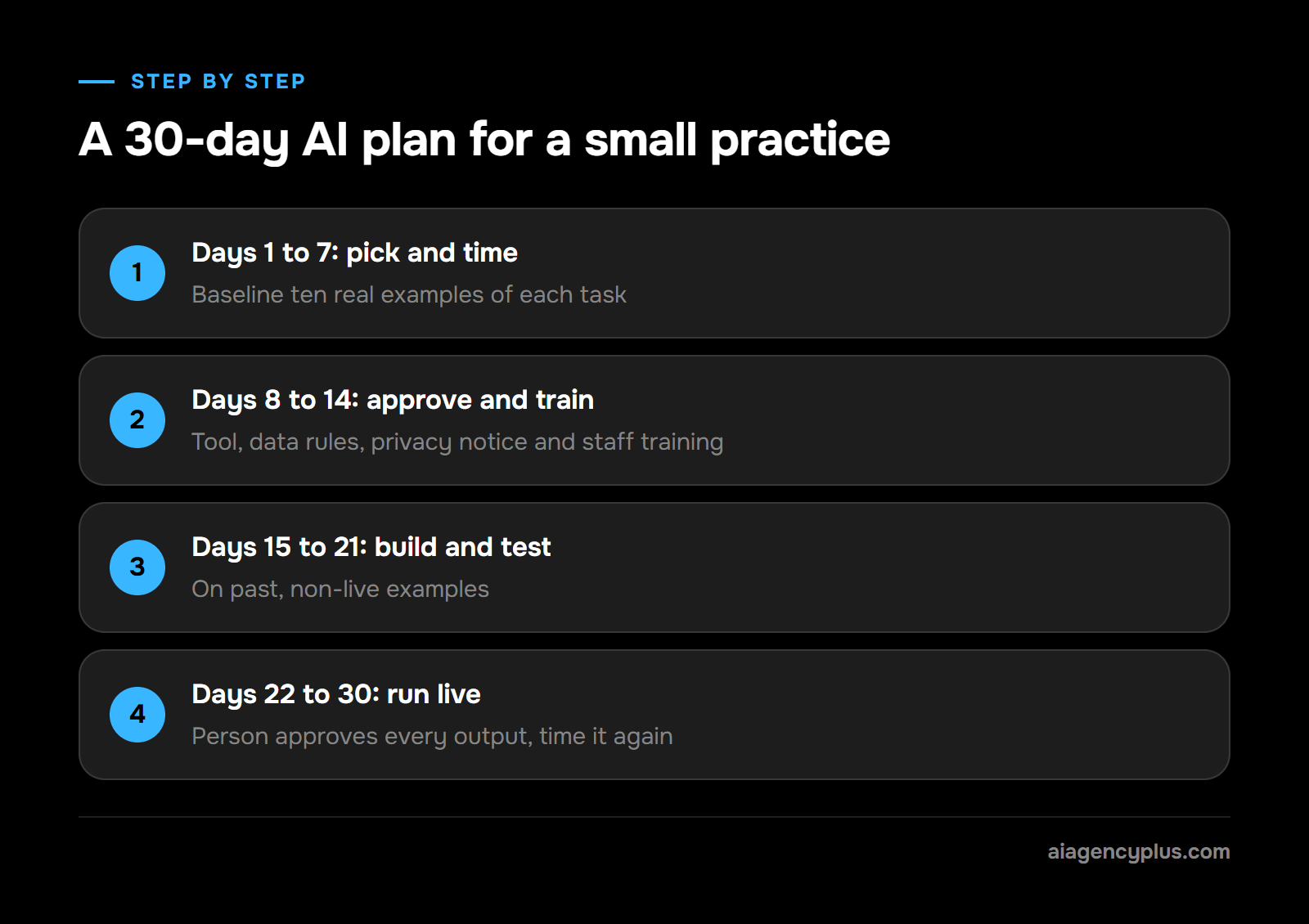
Start with one task, time it before and after, and keep a person reviewing every output. For a 1 to 20 person practice, that means picking the task in week one, agreeing data rules and training staff in week two, building and testing in week three, and running it live under review in week four.
| Days | What you do | Who | How you check it |
|---|---|---|---|
| 1 to 7 | List repeat tasks, time ten real examples of each, pick the one with the most hours and least judgement | Practice manager | Baseline minutes per task written down |
| 8 to 14 | Approve the tool, agree what data it may see, update the privacy notice if needed, and train staff on what the tool may see, how to check its output and what never goes into a public tool | Partner | Data check signed off, staff trained |
| 15 to 21 | Build the workflow and test it on past, non-live examples | Practice manager with the builder | Every test output reviewed, errors logged |
| 22 to 30 | Run live with a person approving every output, then time it again | Whole team | New minutes per task against the baseline |
Training matters because your staff are the review step. Cover what the tool may see, how to check its output and what never goes into a public tool.
For learning material, ACCA's Introduction to AI for accountants and ICAEW's guide to generative AI are useful starting points.
If the timed saving is small at day 30, stop and pick a different task. For typical build and running costs, see AI automation cost in the UK.
If you would rather map this plan against your own practice, Book a Discovery Call.
What should AI not do in an accountancy practice?
AI should not sign off accounts, give tax advice, submit returns or decide whether to accept a client. It should not hold confidential data in a public tool either. Treat it as a fast drafter and sorter, with every decision and every signature left to a qualified person.
- Final review of accounts or returns.
- Tax advice or planning recommendations.
- Filing with HMRC or Companies House without human approval.
- Anti-money laundering checks and client acceptance.
- Difficult client conversations: fee disputes, bad news and complaints.
The short version
Start with the dull, repeatable work: chasers, document intake, routine emails and out-of-hours calls. Time it first, keep client data in approved tools, and have a person review every output. The MTD threshold falls each April to 2028, so the admin you automate now is capacity you will need.
Put the hours you get back into review, client conversations and advisory work. That is where the study reported by MIT Sloan saw time go: away from routine data entry and toward business communication and quality assurance.
Where AI Agency Plus fits
I run AI Agency Plus, an ai automation agency in Leeds. I build business process automation for UK SMEs, such as chasers, document intake and onboarding workflows. A first build runs £1,500 to £5,000 plus VAT and takes one to three weeks.
I also run an AI answering service for out-of-hours calls, from £349 a month plus VAT, with a one-off build fee from £1,500 plus VAT that is waived on a 12-month commitment. It goes live in about three weeks, followed by four to eight weeks of adjustment based on real calls (answering service details). I don't sell accounting software or give accounting advice, so the professional work stays with your team.
If you want to find the first task worth automating in your practice, Book a Discovery Call.
Frequently asked questions
How can accountants use AI?
Accountants can use AI to chase missing records, read and file documents, draft routine emails, summarise calls and suggest bank reconciliation matches. Each of these is high volume and easy to check. A qualified person should review every output before it reaches a client or HMRC.
Is it safe to put client data into a public AI chatbot?
No. ICAEW's Generative AI guide says respecting confidentiality means not loading confidential information into public generative AI tools. Use approved tools on business terms that cover storage, access and model training, and check that your engagement letters and privacy notice cover the processing.
Will AI replace accountants?
No. AI removes typing, sorting and chasing, but professional judgement, advice and sign-off stay with the accountant. PCRT keeps the adviser responsible for the work, whoever or whatever drafted it.
What does ICAEW say about AI?
ICAEW's Generative AI guide says not to load confidential information into public generative AI tools. Its PCRT page lists topical guidance on applying PCRT to the ethical use of AI tools, and PCRT is mandatory for members advising on UK tax. Both were read on 14/11/2026.
How does Making Tax Digital change an accountant's workload?
MTD for Income Tax moves affected clients to digital records and quarterly updates, so each one brings more deadlines and chasers. GOV.UK says it applies above £50,000 from 06/04/2026, £30,000 from 06/04/2027 and £20,000 from 06/04/2028. HMRC estimates around 1,077,000 more sole traders and landlords will join from April 2027.