

AI for law firms works best on the front office and admin: answering enquiries out of hours, intake, scheduling and document admin. The SRA's warning notice of 17/08/2026 names two concerns: invented content in court and other documents, and client information put into AI tools without safeguards. Solicitors stay accountable for every output.
What does the SRA expect from AI for law firms in 2026?
The SRA expects firms that use AI to have governance and controls around it. Its 'Misuse of AI' warning notice, published on 17/08/2026, names two main concerns: AI hallucinations in court and other documents, and confidential client information entered into AI tools without safeguards. (SRA, Misuse of AI warning notice, read 14/11/2026)
The notice applies to all firms and individuals the SRA regulates. A hallucination, in this sense, is text an AI tool invents and presents as fact, such as a case that does not exist.
The notice also makes accountability plain: "AI has no separate legal personality", so the solicitor who uses it stays responsible for the work and the output. Firms need governance and controls for AI risks under paragraph 2.1 of the Code of Conduct for Firms.
The regulator also accepts that AI is already in use. The SRA's own news release of the same date says: "AI is increasingly being used across the legal sector to support tasks such as research, drafting, document review and administrative processes." (SRA news release, 17/08/2026)
The numbers behind the notice
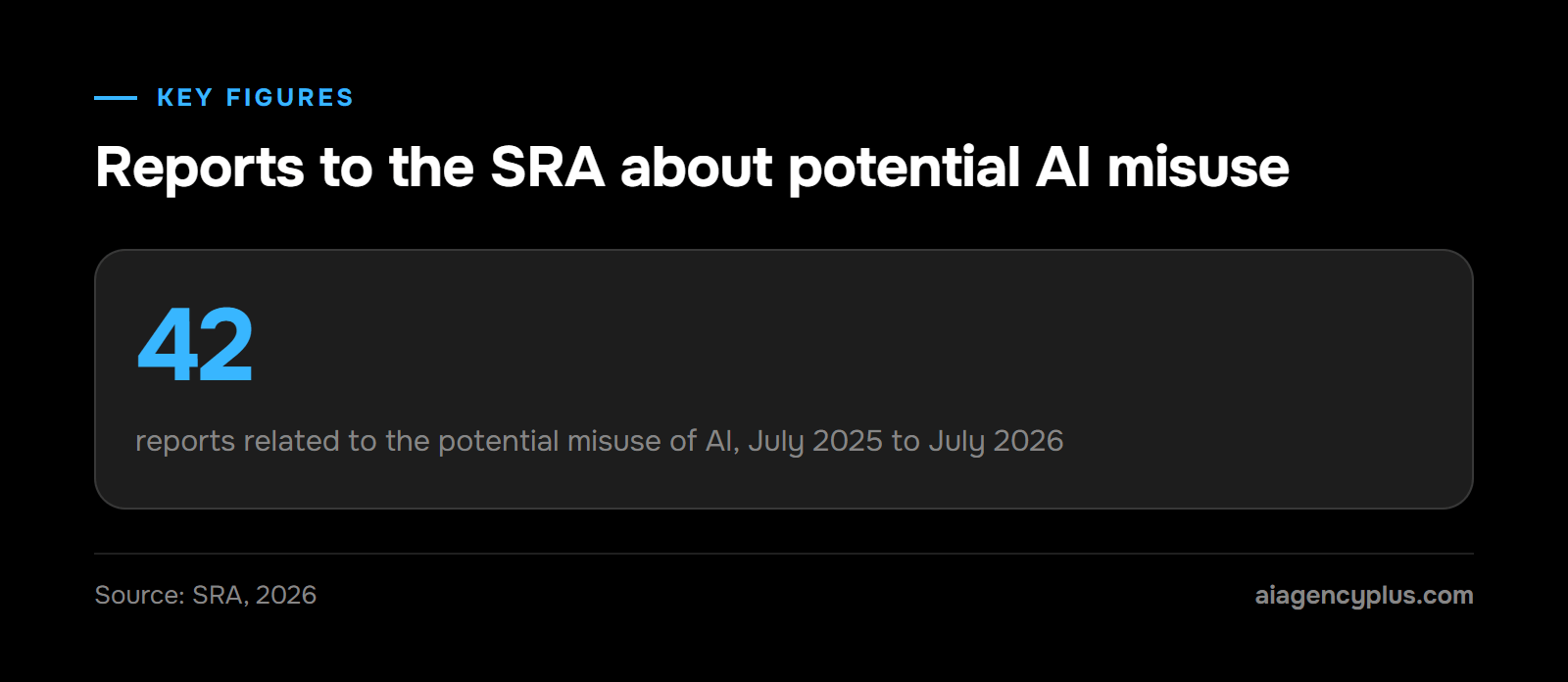
The SRA received 42 reports related to the potential misuse of AI between July 2025 and July 2026. (SRA news release, 17/08/2026) That is a count of reports, not of proven misconduct. The figure on its own does not show whether reports are rising or falling, or how many were upheld.
Adoption is the other half of the picture. Thomson Reuters' 2026 AI in Professional Services Report, a survey that is not UK-only, reported on its blog on 02/07/2026, found that 41% of law firms say their legal teams are using GenAI, up from 28% in 2025. (Thomson Reuters, How AI is transforming the legal profession)
An older SRA figure splits the picture by firm size. Its Risk Outlook report on AI in the legal market, published on 20/11/2023, reported that by the end of 2022 over 60% of large law firms were at least exploring the potential of the new generative systems, as were a third of small firms. (SRA Risk Outlook: AI in the legal market) Treat it as a baseline: it predates both the Thomson Reuters report and the warning notice.
What I am and am not telling you
I build AI systems for UK SMEs. I am not a solicitor, and nothing here is legal advice. This article sets out what the SRA has published and how I would design front-office AI around it.
Whether a particular use is acceptable for your firm is your decision, usually led by your COLP (Compliance Officer for Legal Practice).
If you would rather talk through your own firm's front office, Book a Discovery Call.
Where can AI help a UK law firm with enquiries, intake and admin?
For most small and mid-sized firms, the safest gains from AI are in the front office: answering and logging enquiries, collecting intake details, booking appointments, chasing documents and keeping files tidy. These tasks are repetitive, easy to check and sit around the legal work rather than inside it. AI for solicitors does not have to start with research or drafting.
I would sort front-office tasks into three groups before buying anything. The test is simple. What happens if the AI gets it wrong, and who would notice?
One rule covers anything the AI sends to a client. A message sent from a template the COLP has pre-approved counts as approved, so a person spot-checks a sample. Anything free-text, or new to that client, needs a person's approval before it goes.
Lower risk: AI does it, a person spot-checks
- Answering out-of-hours calls and capturing name, number, matter type and urgency
- Booking and rescheduling initial consultations into the fee earner's calendar
- Sending document checklists and chasing missing ID or forms, using COLP-approved templates
- Naming, sorting and filing incoming documents into the right matter
Needs a gate: AI drafts, a person approves
- Summarising an intake call or form for the fee earner
- Drafting routine client update emails
- Preparing a first-pass client care letter from an approved template
Keep it human
- Legal advice of any kind, including "do I have a case?"
- Fee quotes beyond the firm's published ranges
- Anything filed at court or sent to the other side
- The conflict check decision itself
The pattern is consistent. AI collects, moves and summarises; people make the judgements. For the general case outside law, my guide to what business process automation is covers the basics.
Can a law firm use an AI answering service out of hours?
Yes, a law firm can choose to use an AI answering service out of hours, and the regulator's notice sets the terms. In practice that means a service that captures and routes enquiries rather than advising, says only what the firm has approved, and keeps client data behind agreed safeguards.
Out-of-hours calls are often the ones a firm can least afford to lose: an arrest, a family emergency, a completion that has gone wrong. They are also calls where a distressed caller may say far more than the firm needs at first contact. Good design handles both.
Six design rules I would insist on
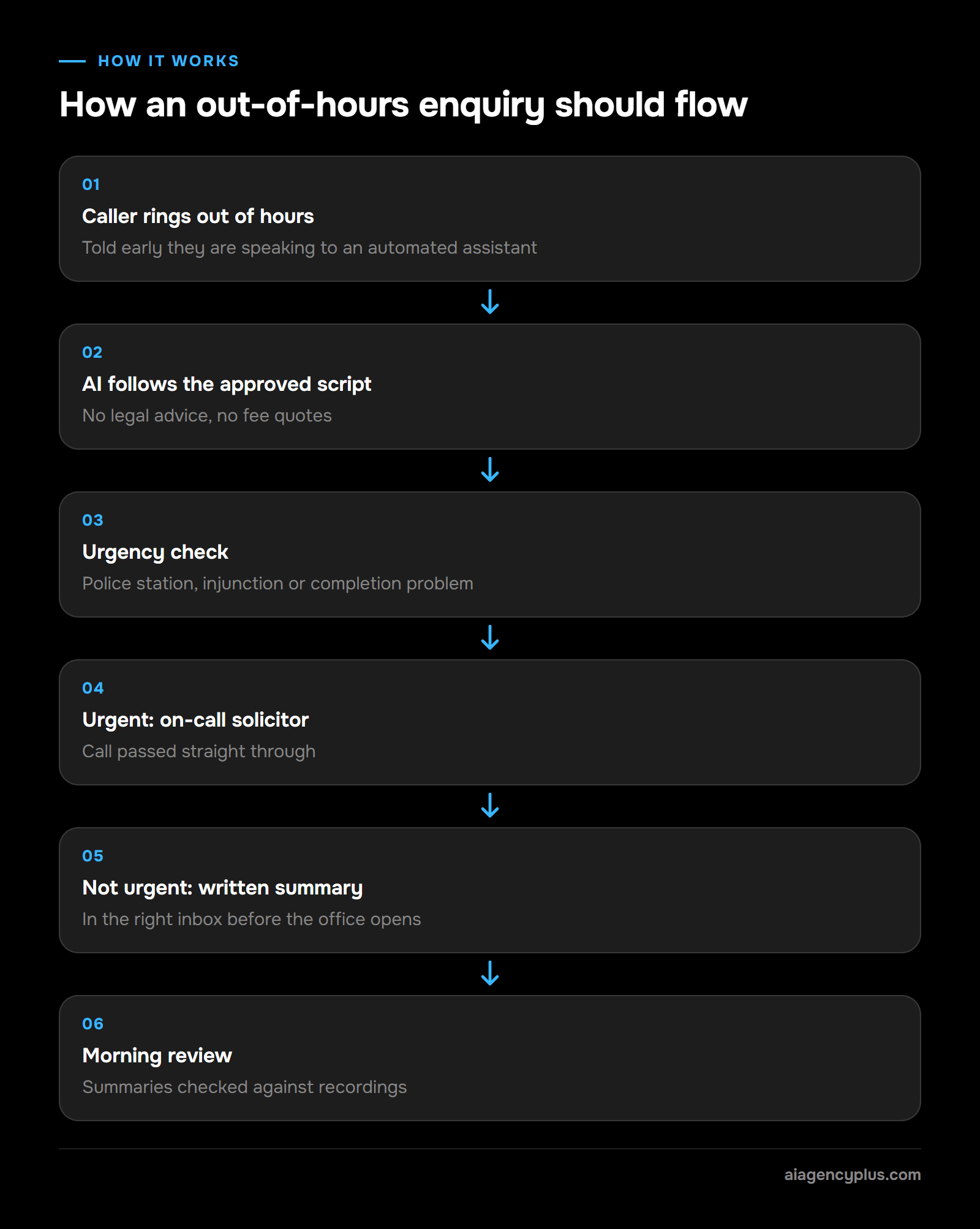
- Signed-off script: every greeting, question and answer is written down and approved before build. The AI does not improvise on law, fees or outcomes.
- Minimum data at first contact: name, callback number, type of matter, a one-line summary, urgency and the other party's name for a conflict check. Full facts wait for a solicitor.
- Clear urgent triggers: a client at the police station, an injunction deadline or a completion problem goes straight to the on-call solicitor.
- Honest disclosure: the caller is told early that they are speaking to an automated assistant and that it cannot give legal advice.
- Clean handover: every other enquiry arrives as a written summary in the right inbox or case management system before the office opens.
- A way out: a caller can reach a person or leave a voicemail at any point. Decide in advance how the script handles a caller who is distressed, vulnerable or struggling to use it.
On whether AI call answering is lawful in the UK, including recording and data protection, see Is AI call answering legal in the UK?. If you are comparing services for a firm, the detail sits on our AI answering service for law firms page.
Illustrative example: one weekend, two calls
This is an illustrative scenario, not a client result. It shows how the rules play out.
- Saturday, 22:40. A caller says her son has been arrested and is at the police station. The AI recognises an urgent trigger, takes her name, number and the station, and passes the call to the on-call solicitor.
- Sunday, 19:15. A caller asks what probate will cost for his late father's estate. The AI does not quote a fee. It takes his details, the matter type and a one-line summary, says someone will call on Monday, and the summary reaches the private client team's inbox before opening.
Check it like this. On Monday morning, compare each summary with the call recording and log any wrong urgency decision. A wrong "not urgent" call is the error that matters most, so tune the triggers first.
Is it safe to put client information into ChatGPT?
Not without safeguards the firm has put in place first. Entering confidential client information into AI tools without safeguards is one of the two main concerns the SRA named in its August 2026 notice. A personal chatbot account gives the firm none of the control it needs.
Under paragraph 6.3 of both Codes of Conduct, client information should only go into AI systems with appropriate contractual, technical and organisational safeguards. (SRA, Misuse of AI warning notice)
What the three kinds of safeguard mean in practice
- Contractual: a data processing agreement with the provider, clear terms on whether your inputs are used to train models, and a stated retention period.
- Technical: business accounts the firm controls, single sign-on, access by role, encryption, and logs of who used what.
- Organisational: a written AI use policy, a list of approved tools, staff training, and a ban on personal accounts for client work.
A free or personal account on any public chatbot is where the problems start. The firm is not party to the contract, cannot control the settings and has no record of what went in. Check the terms of the account your staff actually use rather than a product's marketing page.
Privilege and data protection sit alongside this
Confidentiality is one issue among several. Your UK GDPR duties as a controller, and where the provider stores data, need answers before client data goes in. The ICO's Guidance on AI and data protection is worth giving to whoever runs your DPIA (data protection impact assessment).
Legal professional privilege is a separate question. The SRA's notice warns that putting client information into AI tools this way will likely breach confidentiality, and privilege may be permanently waived. The Law Society's practice note Using artificial intelligence in legal practice sets out the wider duties to clients.
If a fee earner wants AI help with a client document today, my recommended default is simple. Remove names and identifying details first, use only an approved tool, and keep the output on the file with a note of the tool used.
Why does every AI output need a human check?
Because AI tools can produce confident, wrong answers, and that is the SRA's first concern: hallucinations in court and other documents. A case citation that does not exist is the best-known example. A person who understands the matter has to check every output before anyone relies on it.
The SRA's notice points to R (Ayinde) v Haringey LBC [2025] EWHC 1383 (Admin). It says the case "highlighted that AI-generated case citations that turned out to be false were submitted to court". The solicitor and barrister faced a wasted costs application and regulator referrals. (SRA, Misuse of AI warning notice)
The front-office version of a fake citation
Enquiry and admin work does not file anything at court, but the same failure shows up in smaller ways. An AI summary can get a date wrong, attach the wrong matter type or mark an urgent call as routine. A drafted email can promise a callback time nobody agreed.
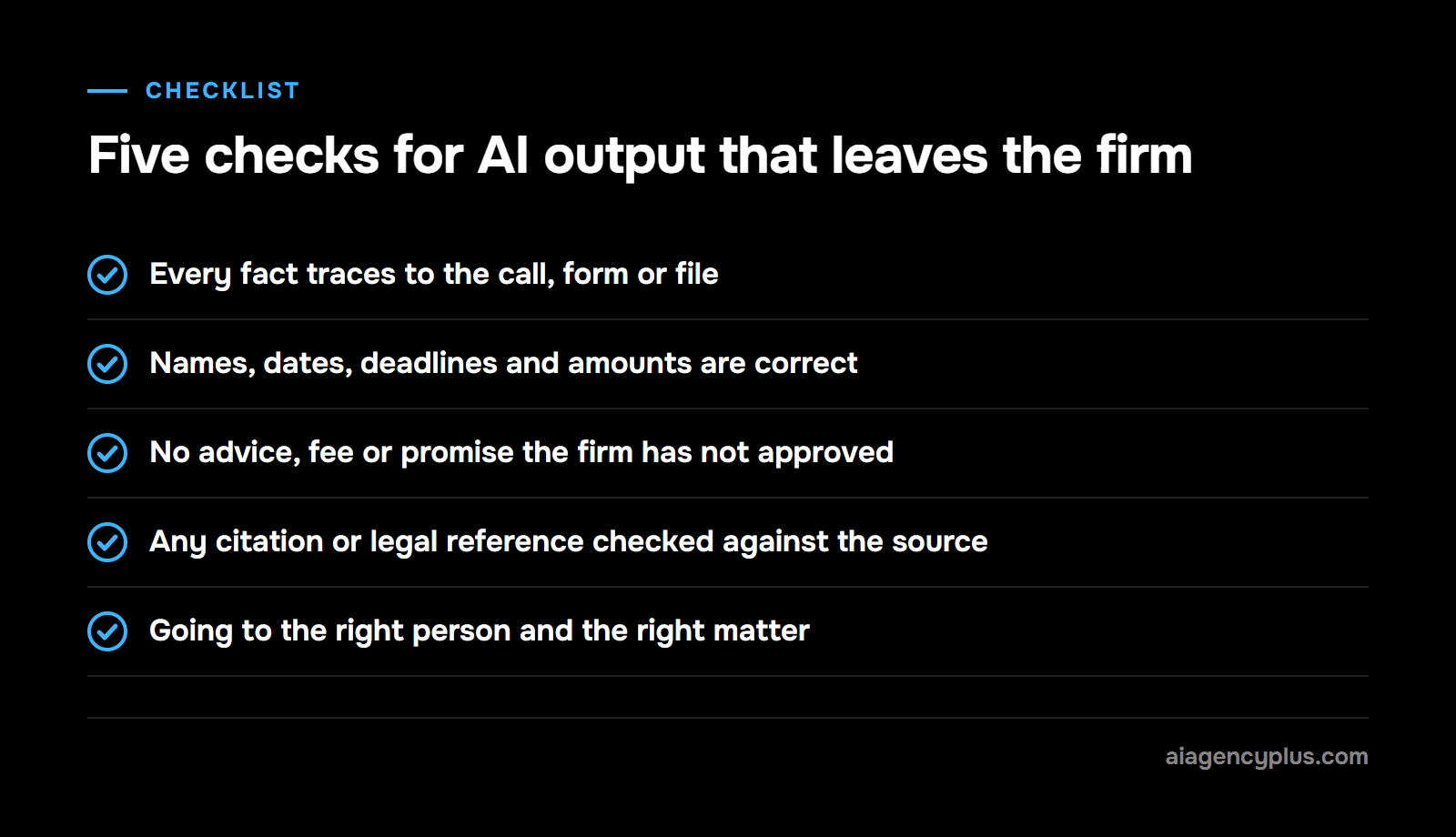
The fix follows the one rule for client messages set out earlier. Anything free-text, new to a client, or for the other side or a court gets the five checks below before it goes. Messages from COLP-approved templates get the same checks on a spot-check sample.
A five-point check for what goes out
- Is every fact traceable to the call, form or file?
- Are names, dates, deadlines and amounts correct?
- Is it free of any advice, fee or promise the firm has not approved?
- Has any citation or legal reference been checked against the original source?
- Is it going to the right person and the right matter?
If the answer to any of these is no or unsure, it goes back.
Who is responsible when AI gets something wrong in a law firm?
The solicitor and the firm stay responsible. The SRA says solicitors who use AI remain accountable for their work and outputs, and firms need governance and controls for AI risks under paragraph 2.1 of the Code of Conduct for Firms. A supplier contract may cover some costs of a failure; the regulatory responsibility stays with you. (SRA, Misuse of AI warning notice)
Check your insurance as well. Ask your professional indemnity insurance (PII) broker whether AI-assisted work and an automated front office are covered by your current policy.
What supervision looks like with AI in the workflow
The SRA added AI sections to its effective supervision guidance in June 2026. (SRA news release, 17/08/2026) If you supervise, be ready to show how you oversee AI-assisted work. For a front-office system, I would put these in place before go-live:
- One named owner, usually the COLP or practice manager, who signs off scripts and changes
- A change log recording what the AI says, who approved it and when
- A weekly sample review of calls, summaries and drafts in the first months
- An incident route: who to tell when the AI gets something wrong, and how it gets fixed
- Staff training on what the tools may and may not be used for
Telling clients you use AI
Clients should be able to see that AI plays a part in handling their matter. State the firm's use of AI where clients already read how their matter is run: the client care letter or terms of business, and the privacy notice. For what that information needs to cover, see the 'Client information requirements' section of the Law Society's practice note Using artificial intelligence in legal practice.
Agentic AI needs tighter limits
Agentic AI means systems that take actions, such as booking appointments, sending emails or updating records, rather than only producing text. They can save more time than text-only tools, and they carry more risk.
Give them narrow permissions and apply the same rule as everywhere else. Messages from COLP-approved templates need only spot-checks; free-text messages, or anything new to a client, need a person's approval before sending. Nothing goes to the other side or a court without a person's approval.
What is a safe first AI project for a small firm?
A safe first project is one process with high volume, low judgement and an easy way to check the output. For most small firms that means out-of-hours enquiry capture, appointment booking or document admin. Start with one, run it under close review, and widen it only once the error log is quiet.
A decision worksheet for your first project
Score each candidate process yes or no on these five questions. Pick the one with the most yes answers.
- Does it happen often enough that someone already complains about it?
- Can a person check the output in under a minute?
- Can the firm keep the client data involved to the minimum?
- If the AI gets it wrong, can the damage be put right before a client is affected?
- Is there one person who owns the process today?
Out-of-hours enquiry capture tends to score well, because the alternative is voicemail and the check is a quick read of a summary. Drafting advice letters scores badly on questions 2 and 4.
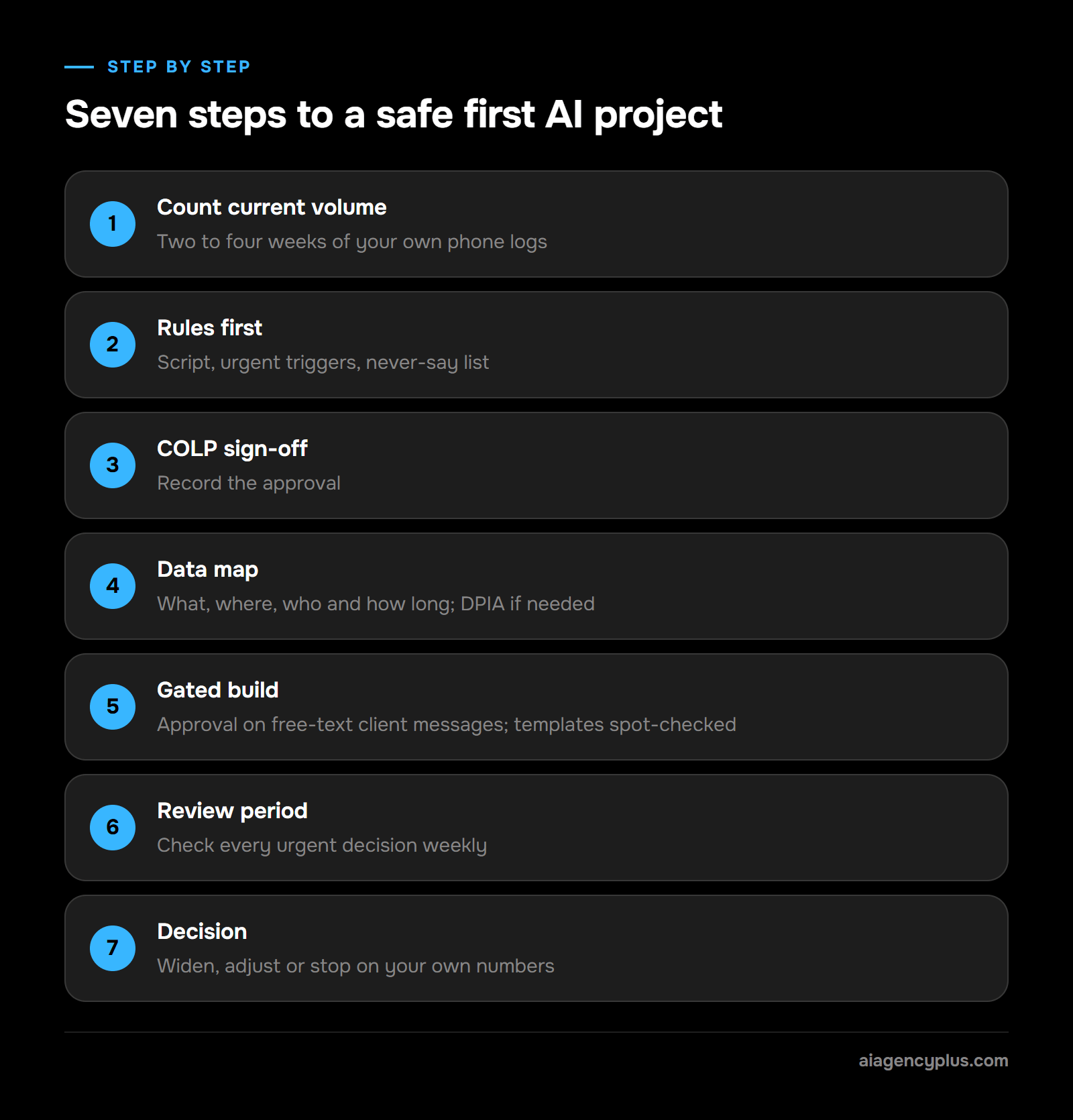
Seven steps from idea to live
- Count current volume: log calls after hours, voicemails left and callbacks made for two to four weeks, using your phone system's own records.
- Rules first: write the script, the urgent triggers and a list of what the AI must never say.
- COLP sign-off: the COLP approves the rules, and the approval is recorded.
- Data map: record what is collected, where it is stored, who can see it and for how long. Run a DPIA where personal data is involved.
- Gated build: a person approves free-text or first-contact client messages; pre-approved template messages are spot-checked.
- Review period: check every urgent decision weekly.
- Decision: widen, adjust or stop, based on your own before-and-after numbers.
When not to buy: if your logs show only a handful of out-of-hours calls a month, voicemail with a fast morning callback may serve you better. The cost side is set out in AI automation cost in the UK.
If you want to talk through where AI could sit in your front office, Book a Discovery Call.
What should you ask an AI supplier before you sign?
Ask where client data goes, who can see it, what the AI is allowed to say, and how the firm stays in control after go-live. A supplier who cannot answer these in writing is not ready for a law firm. Use the table as your shortlist and keep the answers on file.
| Question to ask | Why it matters | A good answer looks like |
|---|---|---|
| Where is client data stored and processed? | Data protection and the SRA's safeguards concern | Named locations and the legal transfer mechanism, in writing |
| Will you sign a data processing agreement? | Contractual safeguard | Yes, before any client data is used |
| Do you pass our data to sub-processors or subcontractors? | Control over who handles client data | A named list of sub-processors, with notice before any change |
| Are our inputs used to train AI models? | Confidentiality | A clear no, stated in the contract |
| How long are recordings and transcripts kept, and who can see them? | Retention and access control | A set period the firm chooses, with role-based access |
| Can the AI give legal advice or quote fees? | Accountability for what it says | No; it follows a script the firm signs off |
| How are urgent matters handled? | Risk of missing a real emergency | Defined triggers and a route to the on-call solicitor |
| Can a caller opt out of the AI? | Fair treatment of callers who cannot or will not use it | Yes, a route to a person or voicemail at any point |
| How do we change the script? | Supervision and change control | Changes approved by the firm and logged with a date |
| What happens if the system fails at 2am? | Continuity | A stated fallback, such as voicemail or a divert |
| What insurance do you hold? | Who pays if the system fails | Named policies and cover, confirmed in writing |
| Can we export our data and leave? | Lock-in | Yes, in a standard format, with deletion confirmed |
The table covers the front-office basics. The Law Society's Buying new technology guide covers these points in more depth, including software escrow, the jurisdiction for disputes and an exit strategy. Read it before you negotiate terms, alongside the governance sections of the practice note Using artificial intelligence in legal practice.
Where AI Agency Plus fits
I run AI Agency Plus, an ai automation agency in Leeds. Our AI answering service for law firms runs to a script the firm signs off before build, and routes urgent matters to the on-call solicitor. The legal page puts the rest plainly: "Every other enquiry is captured in full".
Non-urgent calls are, in our own words, "Captured properly, who called, what they wanted, what they expect to happen next, and waiting in your inbox at 8am rather than as a voicemail nobody transcribes." (AI Agency Plus answering service)
It costs from £349 a month plus VAT. The one-off build fee is £1,500 plus VAT for a standard single-site build, or £2,500 to £4,000 plus VAT for a complex, multi-site or regulated-sector build, and it is waived on a 12-month commitment. Expect around three weeks to go live, then four to eight weeks of tuning. Ask me every question in the table above; you should get the answers in writing.
The short version
AI for law firms is worth doing where the work is repetitive and easy to check: out-of-hours enquiries, intake, scheduling and document admin. The SRA's 'Misuse of AI' notice sets the terms. Check every output, keep client data behind proper safeguards, and remember the solicitor stays accountable.
Start with one process, review it closely and decide on your own numbers. If you want help choosing which process to start with, Book a Discovery Call.
Frequently asked questions
Can solicitors use AI?
Yes. The SRA's August 2026 news release describes AI being used across the legal sector for research, drafting, document review and administrative processes. Its warning notice sets the conditions: check outputs, protect client information and keep accountability with the solicitor.
What does the SRA say about AI?
In its 'Misuse of AI' warning notice, published in August 2026, the SRA names two main concerns: hallucinations in court and other documents, and client confidential information entered into AI tools without safeguards. It says AI has no separate legal personality, so solicitors remain accountable. Firms need governance and controls under paragraph 2.1 of the Code of Conduct for Firms.
Is it safe to put client information into ChatGPT?
Not without safeguards the firm has put in place. Under paragraph 6.3 of both Codes of Conduct, client information should only go into AI systems with appropriate contractual, technical and organisational safeguards. A free or personal account gives the firm none of those controls, so keep client details out of it.
Who is responsible if AI gets something wrong in a law firm?
The solicitor who used the AI, and the firm that allowed it. The SRA says AI has no separate legal personality, so responsibility cannot pass to the tool. A supplier contract may cover some costs, while the professional duty stays with you.
Does an AI answering service replace the on-call solicitor?
No. A well-designed service recognises urgent matters and passes them to the on-call solicitor, then captures everything else for the morning. It should never give legal advice or decide that an urgent matter can wait.